New Participant
December 20, 2018
Answered

How to Save changes made to pdf, without creating new file?

  • December 20, 2018
  • 4 replies
  • 4601 views

I cant save any changes to my pdf with saving an entirely new doc. I dont want to do that I just want to make changes and save it to original?

This topic has been closed for replies.
Correct answer Test Screen Name

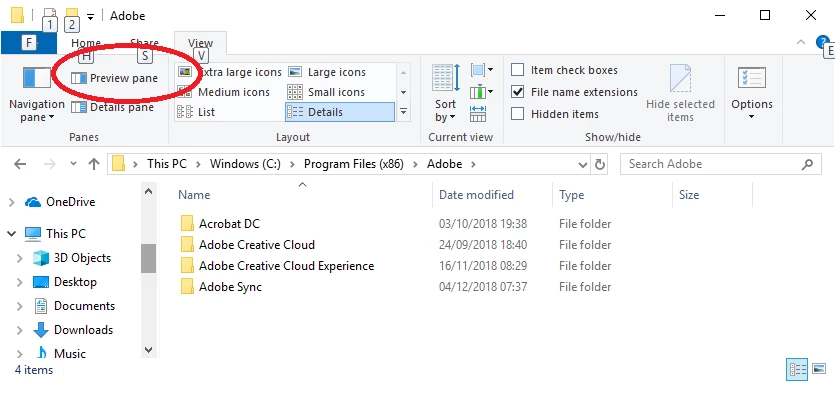
In Windows 10 it is the button shown here
4 replies

New Participant
September 21, 2023

Please tell me how to find the option to save changes I made in a pdf file.

Brainiac
December 20, 2018

Are you in Windows 10? Click this icon in your task bar:

Then click the VIEW button on the ribbon.


(By the way turning off Preview doesn't ALWAYS fix it but it often does).

Test Screen NameCorrect answer
Brainiac
December 20, 2018

In Windows 10 it is the button shown here

tdowell91Author
New Participant
December 20, 2018

I'm an idiot and have no clue how to even get where you are. IM SORRY!

Brainiac
December 20, 2018

Turn off previews in Windows Explorer.

tdowell91Author
New Participant
December 20, 2018

How do I do that?