Inspiring
January 4, 2023
Answered

How to search for checkmarks in comments

  • January 4, 2023
  • 2 replies
  • 1017 views

I'm reviewing a pdf.


I've marked it with comments where issues need attention, either in terms of the document wording or for a followup action to do.


So I'm using the checkmark feature in Acrobat.


However, I can't find a way to search for checkmark boxes filled or those open.


Is there a way to do so?


Thank you.
This topic has been closed for replies.
Correct answer AkanchhaS8194121

Hi @normharris3 


++in addition to what is suggested by expert. 

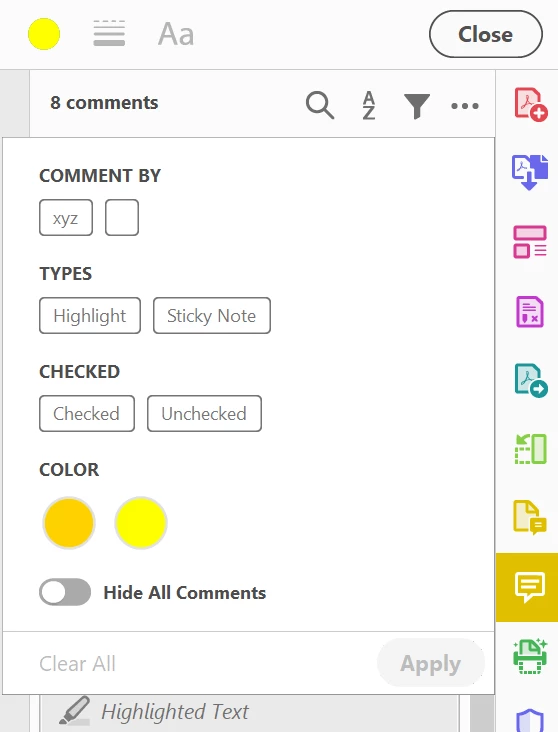
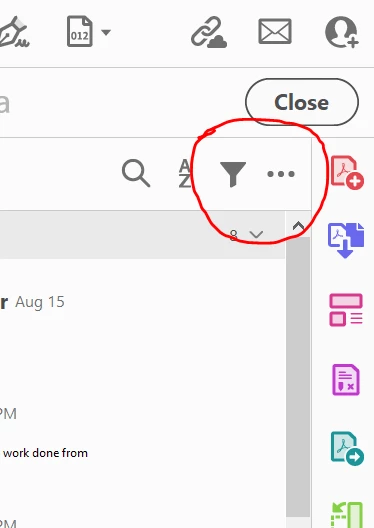
  • Click on this Filter icon.


  • Then select "Checked" Or "Unchecked" to find out Comments with Checkmarks or Without Checkmarks. 


https://helpx.adobe.com/acrobat/using/commenting-pdfs.html 


Hope this helps.


Thanks,

Akanchha


2 replies

AkanchhaS8194121
AkanchhaS8194121Correct answer
Brainiac
January 5, 2023

Hi @normharris3 


++in addition to what is suggested by expert. 

  • Click on this Filter icon.


  • Then select "Checked" Or "Unchecked" to find out Comments with Checkmarks or Without Checkmarks. 


https://helpx.adobe.com/acrobat/using/commenting-pdfs.html 


Hope this helps.


Thanks,

Akanchha


Inspiring
January 9, 2023

Embarrassed. 


Thank you both. This oldie needs to check his bifocals. 😉 LOL


One f/u for the experts....


If you were reviewing documents for your own further action (either to edit, or email or call someone, or....) would you use Sticky Notes and the checkmark feature or would you follow a different approach? Appreciate any recommendations.


Thank you.

Document Geek
Community Expert
January 5, 2023

Filter comments by checked. Either checked or unchecked. It's in the top of the comments pane.