Participating Frequently
October 11, 2023
Answered

How to stop Adobe from opening automatically after printing to PDF

  • October 11, 2023
  • 2 replies
  • 28296 views

Every time I "print to PDF" from anywhere, the document automatically opens in Adobe. How do i get this to stop happenng? 

    Correct answer try67

    No because that doesnt apply to me. The print to PDF feature for me DOES work in all applications. I need it to stop OPENING AUTOMATICALLY in Adobe Acrobat Pro when i print to PDF. 


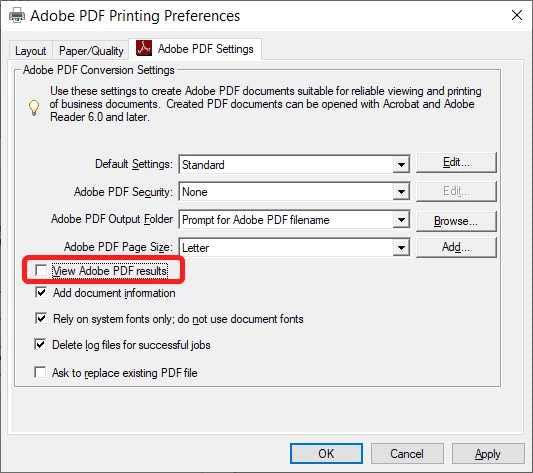
    Open the Printers & Scanners window, click "Adobe PDF" and then Manage, and Printer Preferences.

    Under "Adobe PDF Settings" un-tick the box next to "View Adobe PDF results":


    2 replies

    Dariustor
    Participant
    February 10, 2026

    Hi, 


    I had the same issue in Adobe Acrobat, which always opened the PDF documents I had just saved in Microsoft applications (e.g MS Word). I strongly dislike that this is the default option, as I consider I should have the choice to open my newly-exported PDFs or not. 


    To disable this, I found the following: 

    1. Open Adobe Acrobat 
    2. Navigate to “Menu”, then “Preferences”
    3. Click on “General”
    4. At the end of the “Basic tools” section, deselect the option “Always open PDFs exported from MS Office.”
    5. Click on “OK” to apply the new settings
    6. Quit all open Adobe and MS Office applications
      1. (before doing that, I had an issue where PDFs exported with MS Word would export twice per export request, and the second would always fail)

    The next time you use an MS Office app to export a document to PDF, Adobe Acrobat should not automatically open it.

    kglad
    Community Expert
    Community Expert
    October 11, 2023

    what do you mean by "adobe", reader or acrobat?

    Participating Frequently
    October 11, 2023

    Sorry, Adobe Acrobat Pro

    try67
    Community Expert
    try67Community ExpertCorrect answer
    Community Expert
    October 11, 2023

    No because that doesnt apply to me. The print to PDF feature for me DOES work in all applications. I need it to stop OPENING AUTOMATICALLY in Adobe Acrobat Pro when i print to PDF. 


    Open the Printers & Scanners window, click "Adobe PDF" and then Manage, and Printer Preferences.

    Under "Adobe PDF Settings" un-tick the box next to "View Adobe PDF results":