Answered
How to stop Adobe from opening automatically after printing to PDF
Every time I "print to PDF" from anywhere, the document automatically opens in Adobe. How do i get this to stop happenng?

Every time I "print to PDF" from anywhere, the document automatically opens in Adobe. How do i get this to stop happenng?
No because that doesnt apply to me. The print to PDF feature for me DOES work in all applications. I need it to stop OPENING AUTOMATICALLY in Adobe Acrobat Pro when i print to PDF.
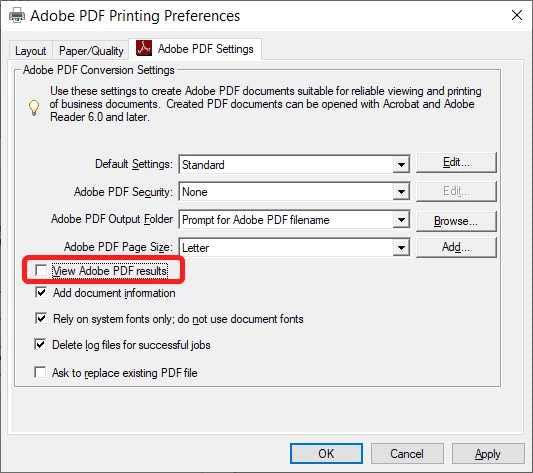
Open the Printers & Scanners window, click "Adobe PDF" and then Manage, and Printer Preferences.
Under "Adobe PDF Settings" un-tick the box next to "View Adobe PDF results":
Already have an account? Login
No account yet? Create an account
Enter your E-mail address. We'll send you an e-mail with instructions to reset your password.


 AdChoices