


- Home
- Acrobat
- Discussions
- Re: How to stop "Reopen Closed PDFs" message.
- Re: How to stop "Reopen Closed PDFs" message.

Copy link to clipboard
Copied
I've followed all of the steps outlined in previous forums and it still continues. I'm using Adobe DC Pro. Thanks.




Copy link to clipboard
Copied
Hi there
We are sorry to hear that.
If you do not wish to see the Blue popup which ask you to Restore your Previous session, you can do it as
1) Close Acrobat/Reader and then Open regedit.exe in Run command.
2) Navigate to the Path: HKLM\SOFTWARE\WOW6432Node\Adobe\Adobe Acrobat\DC\ and create a key with name "FeatureState"
3) In FeatureState Create a new item with Type: "REG_DWORD" Name: "SessionRestorePromptAbnormalExit" and Value: 0
4) Relaunch Acrobat/Reader and observe that the Blue popup won't be coming again for you.
For more information, you may refer to a similar discussion (https://community.adobe.com/t5/acrobat/asking-how-to-stop-the-quot-reopen-closed-pdfs-quot-message-f...)
Let me know if that helps.
Regards
Amal

Copy link to clipboard
Copied
In my case, I didn't want to prevent this pop up for all users on the machine, so my fix was to edit the registry for
HKEY_CURRENT_USER\Software\Adobe\Acrobat Reader\DC\SessionManagement
This key records the open tabs/files. I set the permissions to deny for the user and system. This is preventing Adobe from recording any history and therefore doesn't think anything is there to reopen.
 11
Replies
11
11
Replies
11


Copy link to clipboard
Copied
Hi there
We are sorry for the trouble. As described you want to disable 'Reopen closed PDF' messages
Please try the following preference settings:
Go to Edit (Windows), Adobe Acrobat/Reader DC (Mac) > General > Uncheck, 'Open PDFs from the last session on Acrobat Launch' > Click OK and check.
Also, make sure you have the latest version 20.006.20042 installed. Go to Help > Check for Updates.
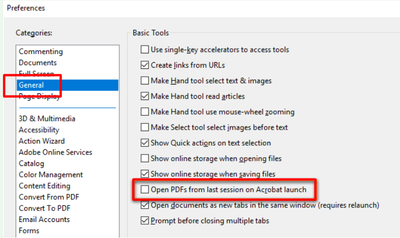
Let us know how it goes
Regards
Amal
Copy link to clipboard
Copied
I have done both of those. Not sure where to go from here.
Copy link to clipboard
Copied
Hi there
We are sorry to hear that.
If you do not wish to see the Blue popup which ask you to Restore your Previous session, you can do it as
1) Close Acrobat/Reader and then Open regedit.exe in Run command.
2) Navigate to the Path: HKLM\SOFTWARE\WOW6432Node\Adobe\Adobe Acrobat\DC\ and create a key with name "FeatureState"
3) In FeatureState Create a new item with Type: "REG_DWORD" Name: "SessionRestorePromptAbnormalExit" and Value: 0
4) Relaunch Acrobat/Reader and observe that the Blue popup won't be coming again for you.
For more information, you may refer to a similar discussion (https://community.adobe.com/t5/acrobat/asking-how-to-stop-the-quot-reopen-closed-pdfs-quot-message-f...)
Let me know if that helps.
Regards
Amal

Copy link to clipboard
Copied
this fixed it. Thank you

Copy link to clipboard
Copied
This helped for me as well!

Copy link to clipboard
Copied
Works for me - thanks!

Copy link to clipboard
Copied
I have followed all instructions and message still pops up every time I open new document. Even more frustrating is that closing documents opens Acrobat home on its own so I have to close every document tvice. And then next time I open a document message pops up and process repeats.
The set up is Adobe X pro for pdf editing, DC for pdf viewing and I use PTC teamcentre from where most of viewed pdfs come.
Copy link to clipboard
Copied
Hi there
We are sorry to hear that
Adobe Acrobat X is an old and EOL application. End of Support means that Adobe no longer provides technical support or distributes runtimes. This policy affects product and security updates for all derivatives of a product or product version (localized versions, minor upgrades, operating systems, dot and double-dot releases, and connector products).
Adobe strongly recommends that customers update to the latest versions of Adobe Acrobat Reader DC and Adobe Acrobat DC. By updating installations to the latest versions, customers benefit from the latest functional enhancements and improved security measures.
For more information please look at the help page https://helpx.adobe.com/acrobat/kb/end-of-support-acrobat-x-reader-x.html
Regards
Amal
Copy link to clipboard
Copied
In my case, I didn't want to prevent this pop up for all users on the machine, so my fix was to edit the registry for
HKEY_CURRENT_USER\Software\Adobe\Acrobat Reader\DC\SessionManagement
This key records the open tabs/files. I set the permissions to deny for the user and system. This is preventing Adobe from recording any history and therefore doesn't think anything is there to reopen.

Copy link to clipboard
Copied
I would like to suppress this popup as well. It's not in the Preferences anymore (well, at least, I can't find it) and I'm not excited about editing the registry.
Is there an update to this problem in 2023?

Copy link to clipboard
Copied
Unbelievable that this feature was ever added to Acrobat.
I do not need a feature to reopen a file when the application was "abnormally exited ".
Fix the application so it doesn't "Abnormally Exit", and make it realize the difference between an "Abnormal Exit", and a user closing the file while the application is still parsing the file. Acrobat does not recognize that I closed the file, because it is busy doing some other action, that I don't care about !
I open and close 100's of files daily. I don't want online colaboration, file parsing, or any other feature other than to open the file and allow me to view the results of the file generation application that I am using !
Open, view, and close should be the highest priority.
Please allow these other resource using features to be turned OFF.
Completely OFF !


Find more inspiration, events, and resources on the new Adobe Community
Explore Now
 AdChoices