
Answered
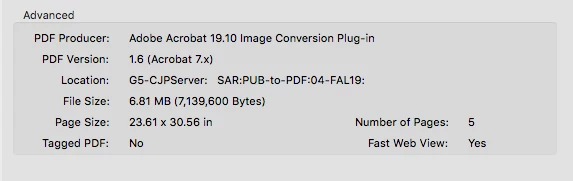
How to turn Fast Web View off in Acrobat Pro DC 2019 for Mac? Using the Preferences does not work
How do you turn Fast Web View off in Acrobat Pro DC 2019 for Mac when optimizing?
Using the Preferences/General or Internet does not work.
Still leaves the Fast Web View on when optimized. Now Chrome will only open the file zoomed in, instead of fit to page. This started out of the blue in the past month with no setting changes. Files with Fast Web View: No seem to work fine and open in Chrome fit to page. Just can not get optimized files to save with Fast Web View: No anymore.
 AdChoices