
Fritz Hansen
Inspiring
September 24, 2024
Answered

How to turn off Recommendations on home screen

  • September 24, 2024
  • 1 reply
  • 4232 views

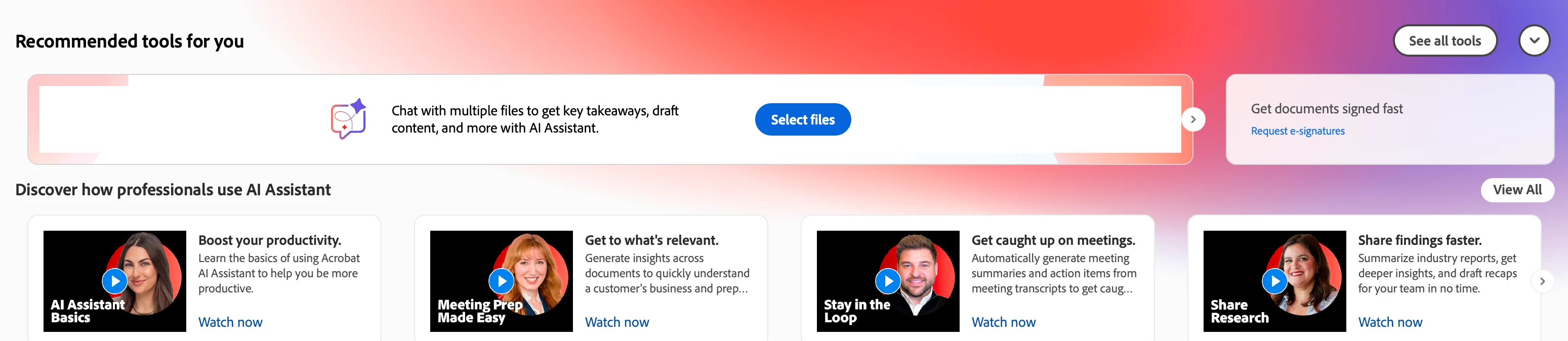
I've seen a lot of commentary about the new interface and the home screen. I agree with many who say new interface is a step backward, but I'm learning to get around some of the annoying aspects. What I'd really like to do is get rid of the annoying irrelevant stuff at the top of the home screen. I don't need Acrobat's recommendations and have no intention of using generative AI any time soon. Is there a way to turn that stuff off so I only see the list of files? 
 

Correct answer sangrover

Hi @Fritz Hansen , Thanks for your feedback. To turn it off, kindly follow the below steps:


1. Go to Preferences > Generative AI.

2. Uncheck the "Show AI video cards" option.

3. Press OK. Restart the application.


Let me know in case you face any issues.


Regards,

Sandeep

1 reply

sangroverCorrect answer
Adobe Employee
September 25, 2024

Hi @Fritz Hansen , Thanks for your feedback. To turn it off, kindly follow the below steps:


1. Go to Preferences > Generative AI.

2. Uncheck the "Show AI video cards" option.

3. Press OK. Restart the application.


Let me know in case you face any issues.


Regards,

Sandeep

Fritz Hansen
Inspiring
September 25, 2024

That got rid of the AI videos, but I still have the Recommended Tools For You, and I was hoping I could get rid of that whole thing. 

Fritz Hansen
Inspiring
September 26, 2024

Hi,

I have sent a message to you with more details. Please check.

Regards,

Charu Karwa


I looked at your message. I don't know what you mean by creating a key (where? how?). Also wondering why you gave that advice in a private message instead of in the support community string.