


- Home
- Acrobat
- Discussions
- Re: How to use only the decimal points in a comput...
- Re: How to use only the decimal points in a comput...

Copy link to clipboard
Copied
I am creating a form in which a somewhat complicated computation is needed to come up with 3 "codes".
There are 14 total digits per code.
1 digit varies in the type of code (0,1,2), 7 digits of which is set/always the same, 5 digits (Item #) will be provided by the user, and the LAST digit will have to be computed by the form.
The last digit will have to be computed like this:
- Add the digits in the odd-numbered positions (first, third, fifth, etc.) together and multiply by three.
- Add the digits in the even-numbered positions (second, fourth, sixth, etc.) to the result.
- Take the remainder of the result divided by 10 (modulo operation). If the remainder is equal to 0 then use 0 as the LAST digit, and if not 0 use the remainder as a whole number and subtract from 10 to derive the LAST digit.
Sample Calculated Answers:
Item # - 11000 - provided by user
Code 1 - 000 35794 11000 0
Code 2 - 100 35794 11000 7
Code 3 - 200 35794 11000 4
So to compute Code 1: 000 35794 11000 0
- Add the odd number digits: 0+0+5+9+1+0+0 = 15.
- Multiply the result by 3: 15 × 3 = 45.
- Add the even number digits: 0+3+7+4+1+0 = 15.
- Add the two results together: 45 + 15 = 60.
- 60/10 = 6 (no remainder so the last digit is 0)
So to compute Code 2: 100 35794 11000 7
- Add the odd number digits: 1+0+5+9+1+0+0 = 16.
- Multiply the result by 3: 16 × 3 = 48.
- Add the even number digits: 0+3+7+4+1+0 = 15.
- Add the two results together: 48 + 15 = 63.
- 63/10 = 6.3 (3 is the remainder) 10-3 = 7
My question is, how do I do this calculation in adobe pdf?
Thank you in advance.





Copy link to clipboard
Copied
Yes, it is possible. Let's say that field is just called "Text1". You can then use this code as the custom calculation script for the last digit:
event.value = "";
var code = "00035794" + this.getField("Text1").valueAsString;
if (code.length==13) {
var digits = code.split("");
var sumOdd = 0;
var sumEven = 0;
for (var i=0; i<digits.length; i++) {
if (i%2==0) sumOdd+=Number(digits);
if (i%2!=0) sumEven+=Number(digits);
}
var subtotal = (sumOdd*3)+sumEven;
var remainder = subtotal%10;
if (remainder==0) event.value = 0;
else event.value = (10-remainder);
}
Change the first digit in the hard-coded value in line #2 for the other codes, of course.
Lines 8 and 9 might seem like they're wrong, but they're not, by the way.
Edit: There was a small error with the name of the code1/code variable, though. I fixed it now.
 8
Replies
8
8
Replies
8


Copy link to clipboard
Copied
How is this all set up? Do you have one field with the 13-digits code and another for the last digit that you want to calculate, or something else?
Copy link to clipboard
Copied
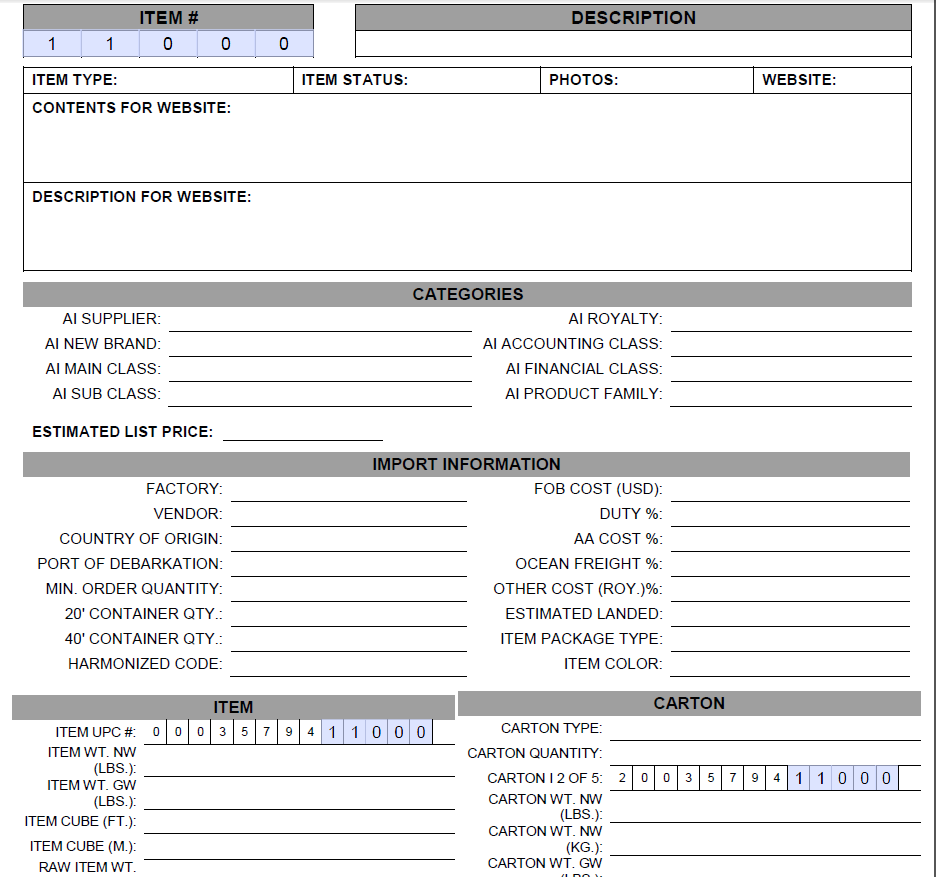
The first 8 regular digits will not be textfields, I'm thinking I can just manually add those numbers in the calculation. Since Item # is user inputted, that part will be individual textfields per digit. I just copied the textfields in the Item # part to the Item UPC # and Carton I 2 of 5 part, so whatever is typed in Item # will automatically show there.
This is how it is setup right now, I haven't added the text field for the last digit yet.
Copy link to clipboard
Copied
OK, and what are the names of those five fields?
Copy link to clipboard
Copied
PS. You can replace them with a single field that has the Comb option enabled and set to 5 characters... That might be easier for the user.
Copy link to clipboard
Copied
Thanks! I know about the combo option but not sure if we can use that option if we need to add the odd and even numbers individually. I thought having the numbers in individual fields will make the computation easier. If you know of a way to compute the last digit while having the Item # in combo option, I would definitely opt for the combo. Text fields name for Item # are, Text1, Text2, Text3, Text4 and Text5.

Copy link to clipboard
Copied
Yes, it is possible. Let's say that field is just called "Text1". You can then use this code as the custom calculation script for the last digit:
event.value = "";
var code = "00035794" + this.getField("Text1").valueAsString;
if (code.length==13) {
var digits = code.split("");
var sumOdd = 0;
var sumEven = 0;
for (var i=0; i<digits.length; i++) {
if (i%2==0) sumOdd+=Number(digits);
if (i%2!=0) sumEven+=Number(digits);
}
var subtotal = (sumOdd*3)+sumEven;
var remainder = subtotal%10;
if (remainder==0) event.value = 0;
else event.value = (10-remainder);
}
Change the first digit in the hard-coded value in line #2 for the other codes, of course.
Lines 8 and 9 might seem like they're wrong, but they're not, by the way.
Edit: There was a small error with the name of the code1/code variable, though. I fixed it now.
Copy link to clipboard
Copied
(I fixed a small mistake in the code above)
Copy link to clipboard
Copied
Oh my god. This worked perfectly. You're a legend. Thank you so much!


Get ready! An upgraded Adobe Community experience is coming in January.
Learn more
 AdChoices