


Known Participant
February 13, 2019
Answered

How to use only the decimal points in a computation?

  • February 13, 2019
  • 1 reply
  • 1354 views

I am creating a form in which a somewhat complicated computation is needed to come up with 3 "codes".

There are 14 total digits per code.

1 digit varies in the type of code (0,1,2), 7 digits of which is set/always the same, 5 digits (Item #) will be provided by the user, and the LAST digit will have to be computed by the form.

The last digit will have to be computed like this:

  1. Add the digits in the odd-numbered positions (first, third, fifth, etc.) together and multiply by three.
  2. Add the digits in the even-numbered positions (second, fourth, sixth, etc.) to the result.
  3. Take the remainder of the result divided by 10 (modulo operation). If the remainder is equal to 0 then use 0 as the LAST digit, and if not 0 use the remainder as a whole number and subtract from 10 to derive the LAST digit.

Sample Calculated Answers:

Item # - 11000 - provided by user

Code 1 - 000 35794 11000 0

Code 2 - 100 35794 11000 7

Code 3 - 200 35794 11000 4

So to compute Code 1: 000 35794 11000 0

  1. Add the odd number digits: 0+0+5+9+1+0+0 = 15.
  2. Multiply the result by 3: 15 × 3 = 45.
  3. Add the even number digits: 0+3+7+4+1+0 = 15.
  4. Add the two results together: 45 + 15 = 60.
  5. 60/10 = 6 (no remainder so the last digit is 0)

So to compute Code 2: 100 35794 11000 7

  1. Add the odd number digits: 1+0+5+9+1+0+0 = 16.
  2. Multiply the result by 3: 16 × 3 = 48.
  3. Add the even number digits: 0+3+7+4+1+0 = 15.
  4. Add the two results together: 48 + 15 = 63.
  5. 63/10 = 6.3 (3 is the remainder) 10-3 = 7

My question is, how do I do this calculation in adobe pdf?

Thank you in advance.
This topic has been closed for replies.
Correct answer try67

Thanks! I know about the combo option but not sure if we can use that option if we need to add the odd and even numbers individually. I thought having the numbers in individual fields will make the computation easier. If you know of a way to compute the last digit while having the Item # in combo option, I would definitely opt for the combo. Text fields name for Item # are, Text1, Text2, Text3, Text4 and Text5.


Yes, it is possible. Let's say that field is just called "Text1". You can then use this code as the custom calculation script for the last digit:

event.value = "";

var code = "00035794" + this.getField("Text1").valueAsString;

if (code.length==13) {

    var digits = code.split("");

    var sumOdd = 0;

    var sumEven = 0;

    for (var i=0; i<digits.length; i++) {

        if (i%2==0) sumOdd+=Number(digits);

        if (i%2!=0) sumEven+=Number(digits);

    }

    var subtotal = (sumOdd*3)+sumEven;

    var remainder = subtotal%10;

    if (remainder==0) event.value = 0;

    else event.value = (10-remainder);

}

Change the first digit in the hard-coded value in line #2 for the other codes, of course.

Lines 8 and 9 might seem like they're wrong, but they're not, by the way.

Edit: There was a small error with the name of the code1/code variable, though. I fixed it now.

1 reply

try67
Community Expert
February 13, 2019

How is this all set up? Do you have one field with the 13-digits code and another for the last digit that you want to calculate, or something else?

Known Participant
February 13, 2019

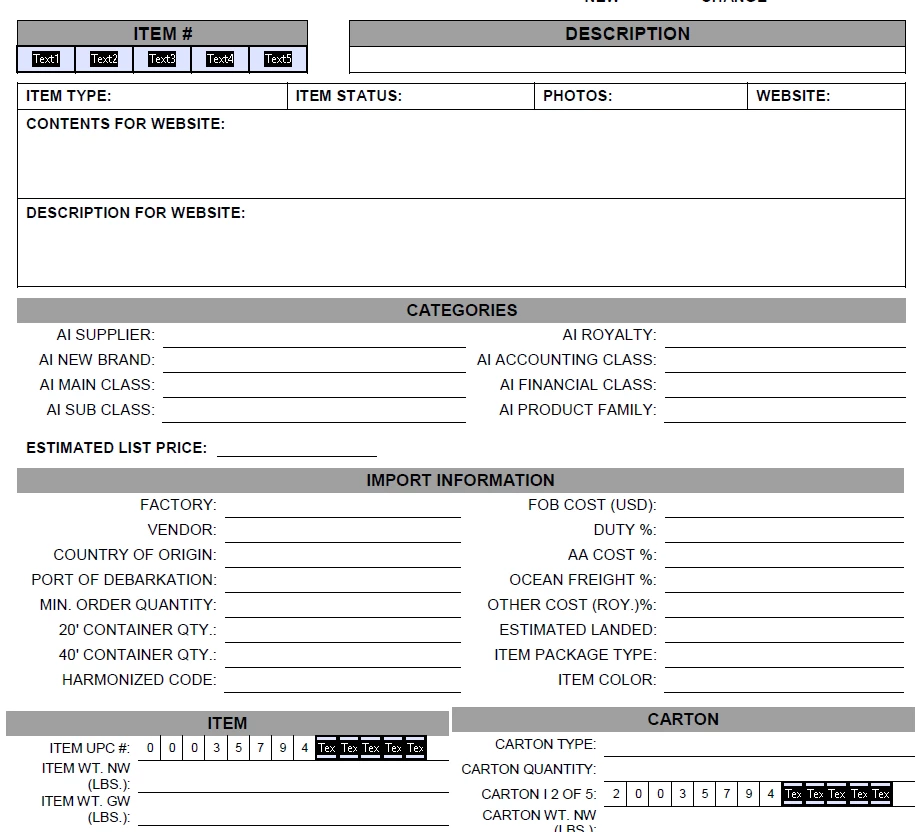
The first 8 regular digits will not be textfields, I'm thinking I can just manually add those numbers in the calculation. Since Item # is user inputted, that part will be individual textfields per digit. I just copied the textfields in the Item # part to the Item UPC # and Carton I 2 of 5 part, so whatever is typed in Item # will automatically show there.

This is how it is setup right now, I haven't added the text field for the last digit yet.

Known Participant
February 13, 2019

PS. You can replace them with a single field that has the Comb option enabled and set to 5 characters... That might be easier for the user.


Thanks! I know about the combo option but not sure if we can use that option if we need to add the odd and even numbers individually. I thought having the numbers in individual fields will make the computation easier. If you know of a way to compute the last digit while having the Item # in combo option, I would definitely opt for the combo. Text fields name for Item # are, Text1, Text2, Text3, Text4 and Text5.