
Hyperlinks in Header - Word to PDF Accessibility
Hello, I've tried so many searches and even AI tools to help me and I can't figure this out. I am new to the accessibility features, so I may need a more detailed explanation.
I'm trying to make my resume from Word an accessible PDF and I'm running into errors in the Accessibility Check and PAC. The issue is that on the second page, I have put my contact information (which contains hyperlinks) into the header so that these items are proccessed as artifacts. I did this because this is redundant information from the first page and I didn't want to interrupt the flow of a screen reader.
The error in Acrobat -
"Tagged Annotations - Failed"
The errors in PAC -
""Link" annotation is not nested inside a "Link" structure element"
"Alternative description missing for an annotation"
The annotations are listed in the content section, but are unable to be found in tags (as the error mentions). When I use find, I can find the unmarked links. I've tried turning them into tags to convert to artifacts, and couldn't. Whatever I've tried doing (which I've tried a lot), a bunch of things are greyed out - including the artifact options.
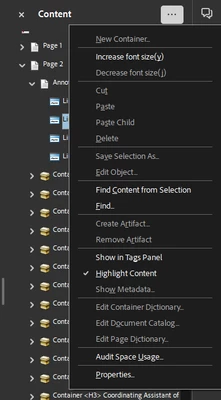
I've also tried going to reading order and artifacting the whole header, but nothing in the header shows up in reading order. Selecting it anyways and artifacting makes no difference.
I'm starting to think it may just be easier to not use the header in Word, and just put it into the body - but that would make it a pain to update my resume in the future. Hopefully I can get some help here. I am really trying to learn how to make documents accessible, but it's been kind of frustrating lol. This is the one puzzle piece missing from it being PDF/UA compliant. Thanks in advance!
 AdChoices