
Participant
April 2, 2013
Answered

I am not able to select the cloud, polygon and connected lines drawing markup tools for commenting.

  • April 2, 2013
  • 7 replies
  • 36230 views

I recently installed Adobe Pro XI. I am unable to select the cloud, polygon and connected lines drawing markup tools. I can see them but they are greyed out so that I am not able to select them.

I am running Windows 7 64bit on an Asus ZenBook laptop.

Any help would be really appreciated.

Kind regards,

KF Panda
This topic has been closed for replies.
Correct answer

Is this laptop touchscreen capable?

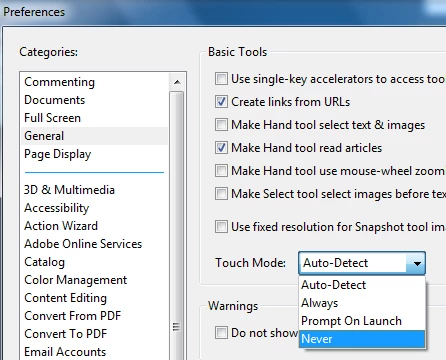
If not, check to see if you have the Touch preference in Adobe Acrobat XI enabled.  If you do, then turn it OFF.

7 replies

Hornwort111
Participant
March 25, 2018

THANKYOU!

Participant
August 24, 2016

Thank you for posting this solution!!

Participant
August 7, 2017

One year later and this post saved me from buying and unneccessary new version!

Thanks!

Participant
August 6, 2024

MANY YEARS later and this post saved me, too! Many thanks!

Participating Frequently
October 16, 2015

Thank you so much!!! Have been suffering without this feature for 2 years.

slyckery
Participant
September 28, 2015

I searched for quite a while to find this fix.  Thanks for posting, @

Participant
January 5, 2015

The cloud polygon and connected line function only works when touch screen is turned off. Is there a fix for this?

Inspiring
April 2, 2013

Is it just those types that you can't select or are all types not available?

Leo HwangAuthor
Participant
April 3, 2013

Just those three types. The others are fine. I have the line, box and text correct tools etc.

[ email signature removed by forum host ]

Correct answer
April 3, 2013

Is this laptop touchscreen capable?

If not, check to see if you have the Touch preference in Adobe Acrobat XI enabled.  If you do, then turn it OFF.

MichaelKazlow
Legend
April 2, 2013

Have you opened a pdf yet? If so make sure the pdf is not password or otherwise protected.

Leo HwangAuthor
Participant
April 2, 2013

I have checked that. I created the PDF document that i am trying to comment

on. So I know it is ok.