
Participant
December 10, 2018
Answered

I am unable to add signature to PDF form

  • December 10, 2018
  • 2 replies
  • 2314 views

Unable to sign one specific form. I have tested this myself, where as we can sign other documents we can not sign this form. When we go to add signature it never pops up or appears on the form. If we delete signature we can recreate it but still it does not appear on the form. This seems to be the only PDF document having this issue.
This topic has been closed for replies.
Correct answer AkanchhaS8194121

Hi Toddl,

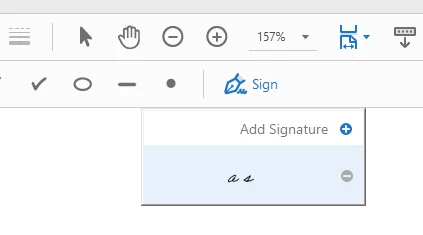
Looking at the information shared above if we understand your query correctly, you are unable to sign a particular form as signature dialog box never comes up? Are you using Fill & Sign tool to add signature and referring to the option shows in the screenshot below?

  • As this is the only form causing trouble signing, then you may check whether forms properties allows to add signature or it doesn't?

       Open PDF>right click "Document Properties"> Security>Document restriction summary> Signing "Allow or Not allow"

  • As workaround, you may once try Sign Out and Sign In from the application just to sync your login credential.

Let us know if its allowed for signature and still doesn't let you sign.

Regards,

Akanchha

2 replies

Participant
March 21, 2023

I have just added Adobe. So I wonder if I did add Adobe correctly. There is an Adobe icon on my desktop, but when I click it, it says incorrect file path cannot open. The document in question is in my email. The documeny says it using Adobe. But even after apparently adding Adobe it will not let me sign the document. I am at a lost what to do here. Thomas

AkanchhaS8194121
AkanchhaS8194121Correct answer
Legend
December 14, 2018

Hi Toddl,

Looking at the information shared above if we understand your query correctly, you are unable to sign a particular form as signature dialog box never comes up? Are you using Fill & Sign tool to add signature and referring to the option shows in the screenshot below?

  • As this is the only form causing trouble signing, then you may check whether forms properties allows to add signature or it doesn't?

       Open PDF>right click "Document Properties"> Security>Document restriction summary> Signing "Allow or Not allow"

  • As workaround, you may once try Sign Out and Sign In from the application just to sync your login credential.

Let us know if its allowed for signature and still doesn't let you sign.

Regards,

Akanchha

Participant
April 21, 2022

Hii,

       My pdf is allowed for signature but still, I can't insert my signature also that option is disabled.