phil_1
Known Participant
January 21, 2025
Answered

I'm shocked that the hand tool is no longer available

  • January 21, 2025
  • 2 replies
  • 2474 views

I use the hand, (pan), tool constantly and now it is gone. I read in this forum you can disable new acrobat and have the old commands available. Why would we need to do that?? The hand tool is one of my most used tools. Am I missing something?

Correct answer bhawnaarora

Hi @phil_1 , hi @creative explorer 


Thanks for posting your queries and hiccups. 

Reading down the comments, I see issues working with Hand tools and key shortcuts in Modern viewer. Please follow the below instructions to have a seamless Acrobat experience(without switching back to Classic view):


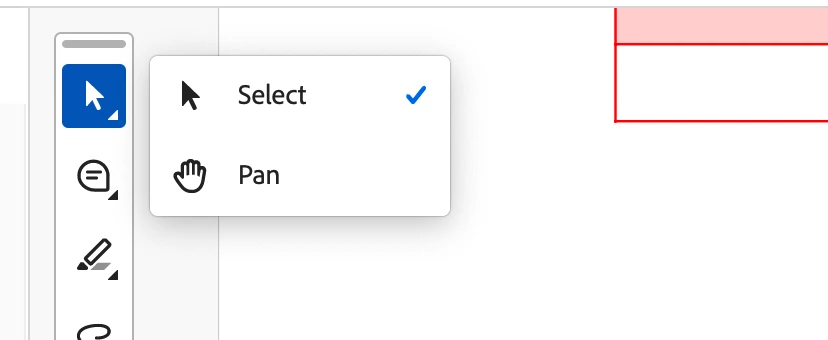
1. Hand tool can be accessed from Quick toolbar, where Select tool option is displayed. Hand tool is available as an option.
 

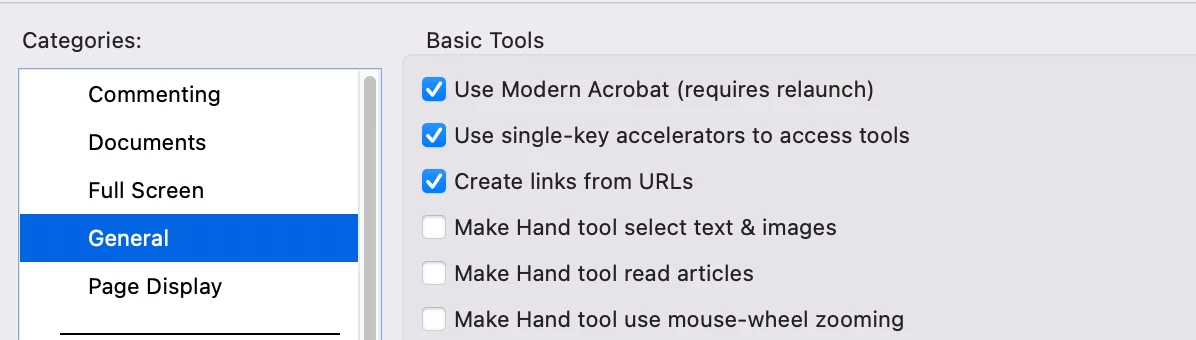
2. For using single key accelerator i.e. H, make sure below preference is turned On:

General > Use Single Key accelerators to access tools

P.s. works for both Win and Mac (requires app restart)
3. Holding Spacebar brings the Hand tool temporarily.


Let us know if this works for you!


Thanks,

Team Adobe.

2 replies

bhawnaaroraCorrect answer
Adobe Employee
January 27, 2025

Hi @phil_1 , hi @creative explorer 


Thanks for posting your queries and hiccups. 

Reading down the comments, I see issues working with Hand tools and key shortcuts in Modern viewer. Please follow the below instructions to have a seamless Acrobat experience(without switching back to Classic view):


1. Hand tool can be accessed from Quick toolbar, where Select tool option is displayed. Hand tool is available as an option.


2. For using single key accelerator i.e. H, make sure below preference is turned On:

General > Use Single Key accelerators to access tools

P.s. works for both Win and Mac (requires app restart)

3. Holding Spacebar brings the Hand tool temporarily.


Let us know if this works for you!


Thanks,

Team Adobe.

creative explorer
Community Expert
Community Expert
January 21, 2025

@phil_1 if you hold the space bar, you still get the hand tool to pan around. I use the keyboard shortcut all the time!

m
phil_1
phil_1Author
Known Participant
January 21, 2025

@creative explorerthat used to work but not anymore. Same with typing H.

Neither work until I disable the new interface.

phil_1
phil_1Author
Known Participant
January 21, 2025
quote

@creative explorerthat used to work but not anymore. Same with typing H.

Neither work until I disable the new interface. Actually typing H still doesn't work. It opens a text box to add to the doc.


By @phil_1