Participant
July 17, 2021
Answered

I type digits in English and they display in Arabic

  • July 17, 2021
  • 2 replies
  • 41347 views

i type digits in english but they show in arabic , why ? 

i even uncheck hindi digits from language 

support

Correct answer Zaid Al Hilali

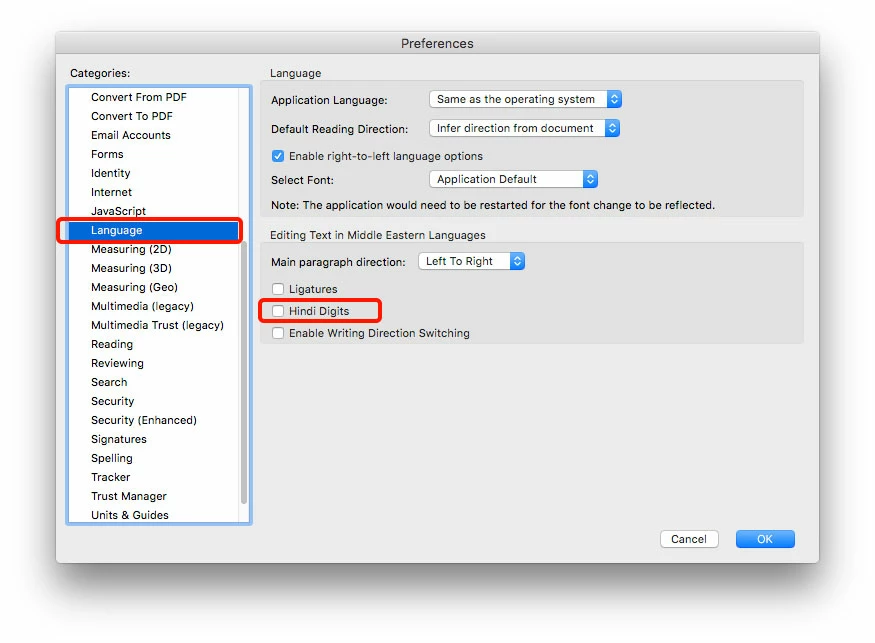
Change Preferences settings as follows, let me know if this helps…
2 replies

Participant
November 14, 2023

Hello,


I am having the same problem. I have tried everything any numbers I type comeout in Arabic. Please help.

Zaid Al Hilali
Community Expert
Zaid Al HilaliCommunity ExpertCorrect answer
Community Expert
November 14, 2023

Change Preferences settings as follows, let me know if this helps…

Participant
November 14, 2023

Hi Zaid,


Thanks very much that has worked. 

Much appreciated Richard

Amal.
Community Manager
Community Manager
July 19, 2021

Hi Basheer


Hope you are doing well and sorry to hear that. As described the digits appear in Arabic but you type in English.


Is this a behavior with a particular PDF file or with all the PDFs? Please try with a different PDF file and check.


What is the workflow/steps you are doing? Please share the screenshot or a small video recording for a better understanding of the issue.


What is the version of the Adobe Acrobat DC you are using? To check the version go to Help > About Acrobat and make sure you have the application updated to the latest version 21.05.20058. Go to Help > Check for Updates and reboot the computer once.


Also go to Edit (Win), Adobe Acrobat (Mac) > Preferences > Language > Set Application language to English > Click OK and reboot the application.


Regards

Amal

Participant
July 25, 2021

the issued has been solved by changing the digits standard from windows settings , thank you 


but i have another issue when edit any sentence containing digits and text Example i have this text in pdf "

when i edit and add 3 to w.o 003 to become 0033 , the text direction change to this 


Zaid Al Hilali
Community Expert
Community Expert
July 26, 2021

Salam Basheer,

You know that PDF is not the right place to edit text, I mean it is not a word processor, I advise the users to always go back to the original file and do the changes there then generate a fresh PDF.


Having said that, with limited changes and edits such as in your situation. Did you try to change Text Alignment in the format panel on the right?

You may also need to visit Acrobat's Language Preferences to see some Middle Eastern options to see what is the settings for " Main paragraph direction" drop menu.