Participant
December 8, 2020
Answered

I want to add a drop shadow to text in a pdf doc

  • December 8, 2020
  • 5 replies
  • 12558 views

I'm trying to add a drop shadow to my text in a pdf document

This topic has been closed for replies.
Correct answer JR Boulay

Acrobat cannot do that, but Illustor can:


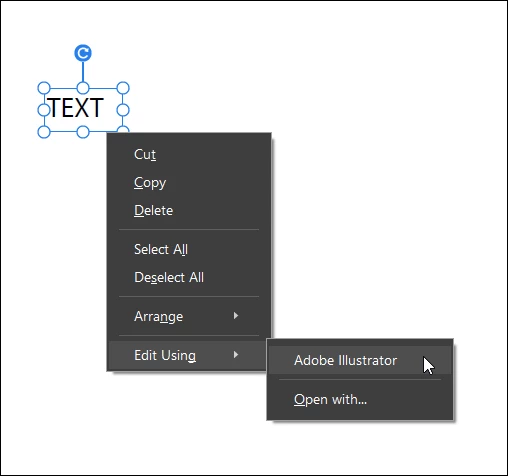
Open the PDF with Acrobat Pro, select the text block using the "Edit" tool, right-click: Edit using : Illustrator.

After making changes in Illustrator: Save: Close.

The changes are reflected immediately in the PDF document opened in Acrobat Pro.
 

5 replies

JR Boulay
Community Expert
JR BoulayCommunity ExpertCorrect answer
Community Expert
December 8, 2020

Acrobat cannot do that, but Illustor can:


Open the PDF with Acrobat Pro, select the text block using the "Edit" tool, right-click: Edit using : Illustrator.

After making changes in Illustrator: Save: Close.

The changes are reflected immediately in the PDF document opened in Acrobat Pro.


Acrobate du PDF, InDesigner et Photoshopographe
Abambo
Community Expert
Community Expert
December 8, 2020

What program did you use to create the PDF document? 

ABAMBO | Hard- and Software Engineer | Photographer
try67
Community Expert
Community Expert
December 8, 2020

You can't do that in Acrobat. You should do it in the application used to create the original file, such as InDesign, and then create a new PDF file from it.

Just Shoot Me
Legend
December 8, 2020

Your post was moved to a better forum, Acrobat.

John T Smith
Community Expert
Community Expert
December 8, 2020

Please post the exact name of the Adobe program you use so a Moderator may move this message to that forum

Participant
December 8, 2020
Adobe Acrobat