
Known Participant
October 18, 2023
Question

IF Then Formula needed with Check Boxes

  • October 18, 2023
  • 2 replies
  • 1207 views

Hi,


I have created a performance evaluation form with checkboxes that should populat a value in the "Score" column if only 1 of the boxes in the preceeding 5 columns are checked. The result will show a number between 1-5, which aligns with our scoring system. This is the formula I have but I am having trouble getting it to work.


var A = this.getField("CheckBox1").value

var B = this.getField("CheckBox2").value

var C = this.getField("CheckBox3").value

var D = this.getField("CheckBox4").value

var E = this.getField("CheckBox5").value;

if(A=="CheckBox1") event.value=1;

else if(B=="CheckBox2") event.value=2;

else if(C=="CheckBox3") event.value=3;

else if(D=="CheckBox4") event.value=4;

else if(E=="CheckBox5") event.value=5;

else event.value=0;


See attached screenshot on what the end result should look like. I am looking for an "IF THEN" formula that will show this result.


Thank you so much for your help!
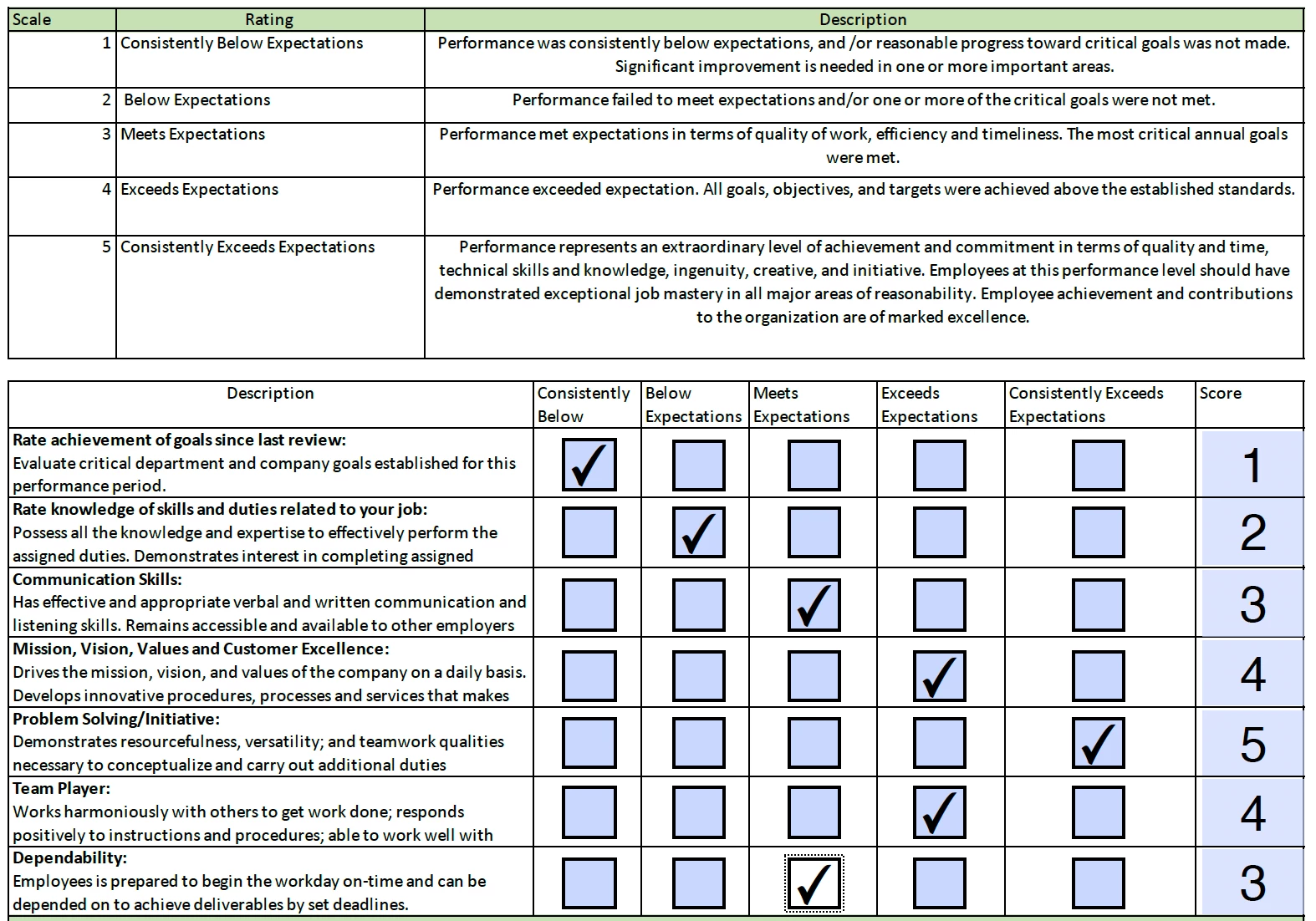


This topic has been closed for replies.

2 replies

try67
Community Expert
Community Expert
October 18, 2023

[Question moved to the Acrobat forum]

Known Participant
October 18, 2023

@try67 are you able to help me with this?


try67
Community Expert
Community Expert
October 18, 2023

Assuming you don't want the user to be able to select more than one option in each row you should give the fields in that row the same name, but different export values (1-5). Then the code will be very simple.

Let's say the field row is named Row1. You can use this code as the custom calculation script of the score field:


var v = this.getField("Row1").valueAsString;

event.value = (v=="Off") ? "" : v;

Known Participant
October 18, 2023

Thank you! Would it then look like this?:


var v = this.getField("Row1").valueAsString;

event.value = (v=="Off") ? "" : v

if(A=="CheckBox1") event.value=1;

else if(B=="CheckBox2") event.value=2;

else if(C=="CheckBox3") event.value=3;

else if(D=="CheckBox4") event.value=4;

else if(E=="CheckBox5") event.value=5;

else event.value=0;