Participant
September 6, 2024
Answered

If/then scenarios

  • September 6, 2024
  • 2 replies
  • 723 views

Hello, 

I have a drop box with 4 options. What do I put in my text field box to produce a specific statement depending on what option is chosen?

Thank you.

This topic has been closed for replies.
Correct answer PDF Automation Station

And one other question - where do I insert the script? Thank you 🙂


The entire script goes in the field where you want the text to display, the calculate tab, as a custom calculation script.  This article will help with the difference between validation and calculation scripts and when to use them.

2 replies

Nesa Nurani
Community Expert
Community Expert
September 6, 2024

Let's say your text field is called "Text1" (replace this name with your actual text field name in the script), and replace "A", "B", "C", "D" with your actual options in dropdown:

var f = this.getField("Text1");
if(event.value == "A")
 f.value = "Replace this text with statement for A";
else if(event.value == "B")
 f.value = "Replace this text with statement for B";
else if(event.value == "C")
 f.value = "Replace this text with statement for C";
else if(event.value == "D")
 f.value = "Replace this text with statement for D";
else
 f.value = "";

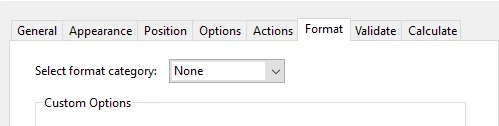
You can put script under 'Validate' tab of dropdown field:

PDF Automation Station
Community Expert
Community Expert
September 6, 2024

var option=this.getField("Dropdown").value;

if(option=="A")

{event.value="Option A"}

else if(option=="B")

{event.value="Option B"}

else if(option=="C")

{event.value="Option C"}

else if(option=="D")

{event.value="Option D"}

else {event.value=""}


Participant
September 6, 2024

Thank you! And where do I add the statements for each option?

Participant
September 6, 2024

And one other question - where do I insert the script? Thank you 🙂