
Import comments or annotations from a pdf file to another pdf file programmatically
Hi
So the case here is that I am having a task to make a composite pdf file including annotations from several file versions (same pdf files with same structures but getting comments from different people).
This is done usually through Adobe Acrobat using Import Data File option to import comments from each file, which is a nice feature that is working seamlessly in Adobe.
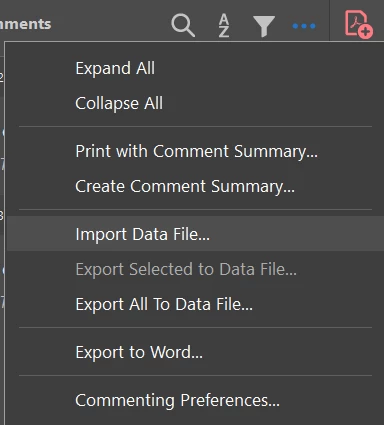
However, I am having a huge number of files to make such composite from other different files. So things are getting very tedious and complicated.
So my intention here is to automate this process by importing all the needed files with a VBA script and do this process once with all files. I have been looking within Adobe object on Excel VBA, but I haven't seen such an option to import data file working out of the box.
So I had to get each annotation from the file with comments, create a new annotation in the file where I want to paste the comments, and set it all the properties of the original annotation I want.
The annotations were added but in a distorted manner as they rotated, not in the correct positions, and arrows or lines didn't appear, not all the properties (such as fill colors for text boxes) were set.
I have also looked in Javascript API, but I found that it only imports FDF or XFDF or attachment files and NOT the annotations as in the case of the normal Adobe GUI. This was the documentation link where I looked at the Javascript Doc object:
https://opensource.adobe.com/dc-acrobat-sdk-docs/library/jsapiref/doc.html
I am wondering how this option (Import Data File) is available on GUI only. Or am I mistaken and there is a function that does this out of the box or at least a workaround?
This is the VBA code I wrote for reference:
Sub pdfInterface()

    Set AcroApp = CreateObject("AcroExch.App")

    Set Part1Document = CreateObject("AcroExch.PDDoc")
    Set Part2Document = CreateObject("AcroExch.PDDoc")

    Part1Document.Open ("C:\Users\dell\Sample 1.pdf")
    Part2Document.Open ("C:\Users\dell\Downloads\Sample 1.pdf")

    Set DocPage = Part1Document.AcquirePage(1)
    Set DocPage2 = Part2Document.AcquirePage(1)

    numberOfPages = DocPage2.GetNumAnnots()
    Set Rect = CreateObject("AcroExch.Rect")


    annotNumber = DocPage.GetNumAnnots()
    For i = 0 To annotNumber - 1
        Set Annot = DocPage.GetAnnot(i)
        Set Rect = CreateObject("AcroExch.Rect")
        Set oldRect = Annot.GetRect()
        annotType = Annot.GetSubtype()
        With Rect
            .bottom = oldRect.Left
            .Left = oldRect.Top
            .Right = oldRect.bottom
            .Top = oldRect.Right
        End With

        Set myAnnot = DocPage2.AddNewAnnot(i - 1, annotType, Rect)
        With myAnnot
            .SetContents (Annot.GetContents())
            .SetTitle (Annot.GetTitle())
            .SetColor (Annot.GetColor())
            .SetDate (Annot.GetDate())
        End With
        Save = Part2Document.Save(PDSaveFull, "C:\Users\dell\Downloads\Sample 1.pdf")
    Next i
    End Sub
Thanks in advance.
 AdChoices