
nicholkid
Participant
September 12, 2018
Answered

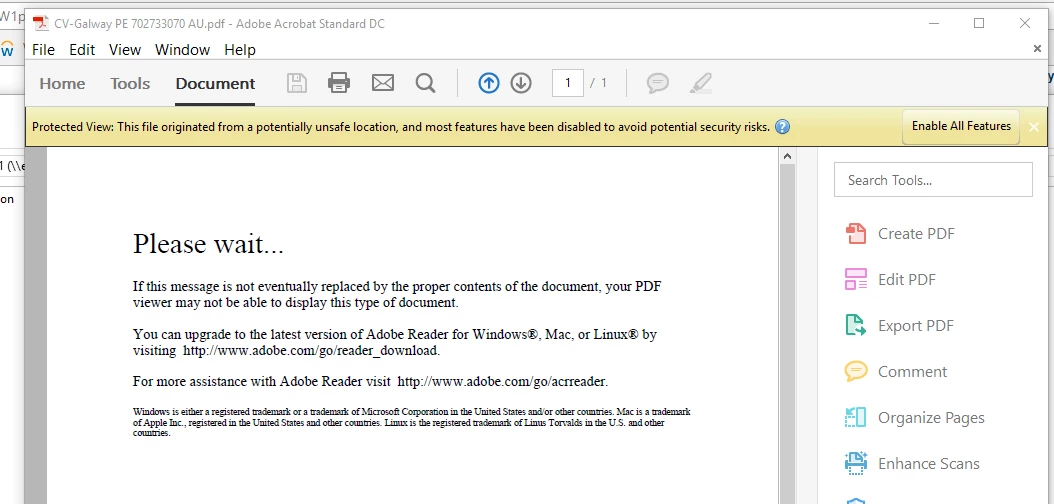
[In Acrobat Standard] Error: "If this message is not eventually replaced by the proper contents..."
  • September 12, 2018
  • 5 replies
  • 2018 views

I tried googling for this problem, but every single instance of the issue was due to the user trying to open a pdf in a browser. But here, as you can see, the pdf is being opened in Acrobat Standard.

I have tried:

- Saving the file to a different location and opening from there

- Getting a new copy of the file from someone

- Opening in Microsoft Edge and Internet Explorer

- Updating version

Thanks in advance for the help!

Correct answer Adorobat

Hi nicholkid,

As per the issue description mentioned above,  user is unable to open a pdf file as he is getting above mentioned error when opening in Acrobat, is that correct?

As you mentioned,  user it opening it straight from an email in outlook by double-clicking the file, try saving it to the local machine first and then open. Does that work?

Also, try clicking "enable all features" on the bar at the top and check if that helps.

You may refer to the the following help document for more info:

PDF won’t display. Please wait …

Let us know how it goes.

Shivam

5 replies

Participant
September 5, 2025

Try these quick fixes in Acrobat Standard:

Test another PDF. If only one file fails, ask the sender to re-export it.

Go to Help > Repair Installation.

In Preferences > Security (Enhanced), turn off “Protected Mode at startup” and restart.

If still not working, close Acrobat and rename the folder under:
C:\Users\YourUserName\AppData\Roaming\Adobe\Acrobat
Then relaunch Acrobat (a fresh profile is created).

Last option: uninstall Acrobat, run Adobe Cleaner Tool, and reinstall.

Participant
September 3, 2025

Hey Guys, I am having the exact same issue. Not sure if anyone was able to find a solution?

Community Manager
September 4, 2025

Hi @Clever_athlete1265

Thanks for reaching out. This is a very old thread, and we aren't sure what version of the Acrobat or Reader app you are using. 
Is it a laptop/desktop or a mobile device?


In the meantime, for more information on this issue on this issue please visit: https://adobe.ly/4gaTQZN;


Best regards,
Tariq | Adobe Community Team

Adorobat
AdorobatCorrect answer
Participating Frequently
November 23, 2018

Hi nicholkid,

As per the issue description mentioned above,  user is unable to open a pdf file as he is getting above mentioned error when opening in Acrobat, is that correct?

As you mentioned,  user it opening it straight from an email in outlook by double-clicking the file, try saving it to the local machine first and then open. Does that work?

Also, try clicking "enable all features" on the bar at the top and check if that helps.

You may refer to the the following help document for more info:

PDF won’t display. Please wait …

Let us know how it goes.

Shivam

try67
Community Expert
Community Expert
September 12, 2018

[Question moved to the Acrobat General Troubleshooting forum]

Legend
September 12, 2018

When we’ve seen this in Acrobat it has always been an error in the file. The error could be caused by

- something the creator did

- email or firewall mangling

- how you saved the file on receipt

What do document properties show for creator and producer? How do you save it on receipt exactly?

nicholkid
nicholkidAuthor
Participant
September 13, 2018

He was just opening it straight from an email in outlook (double clicking the file).

Had the user send the trouble file to me and I was able to open it straight away. Seems like only he is having the problem.

Also, he is using Acrobat Standard and I just have Reader DC.

Thanks.