
Exit
  • Global community
    • Language:
      • Deutsch
      • English
      • Español
      • Français
      • Português
  • 日本語コミュニティ
  • 한국 커뮤니티
0

Indexing PDFs

Community Beginner ,
Jul 08, 2017 Jul 08, 2017

I have scanned documents into Adobe Acrobat Pro DC; averaging 30 pages per .pdf file.  I currently have 5 files, working to create 87 more.  The pages I scan are cursive, so OCR is not available.  In order to create points of interest, I have bookmarked pages using consistent verbiage (i.e.  Membership, Constitution, By-Laws)   I have created an embedded index with each file, then used the 'Full Text Index with Catalog' option.  I identified the file folder containing the five files and clicked the create.  Things happened, I got a .pdx. 

WHAT I WANTED was the information in my bookmarks to become part of an index.  It did not... have I missed a step?  Am I asking the impossible?  Can you MAKE this work?  Thank you!!!
TOPICS
General troubleshooting
4.2K
Translate
Report
Community guidelines
Be kind and respectful, give credit to the original source of content, and search for duplicates before posting. Learn more
community guidelines
1 ACCEPTED SOLUTION
Community Expert ,
Jul 09, 2017 Jul 09, 2017

It's been well over a decade since I've created an Index in Acrobat, so maybe someone else will jump in.

The purpose of an Index (these days) is to make a Search faster. Bookmarks can be included in the Search.

https://helpx.adobe.com/acrobat/using/creating-pdf-indexes.html

What is not working?

View solution in original post

Translate
Report
Community guidelines
Be kind and respectful, give credit to the original source of content, and search for duplicates before posting. Learn more
community guidelines
Community Expert ,
Jul 09, 2017 Jul 09, 2017

You posted in the Adobe Acrobat Reader forum. You can't create Indexes with Reader, so I moved this to to Acrobat General Troubleshooting.

Translate
Report
Community guidelines
Be kind and respectful, give credit to the original source of content, and search for duplicates before posting. Learn more
community guidelines
Community Expert ,
Jul 09, 2017 Jul 09, 2017

It's been well over a decade since I've created an Index in Acrobat, so maybe someone else will jump in.

The purpose of an Index (these days) is to make a Search faster. Bookmarks can be included in the Search.

https://helpx.adobe.com/acrobat/using/creating-pdf-indexes.html

What is not working?

Translate
Report
Community guidelines
Be kind and respectful, give credit to the original source of content, and search for duplicates before posting. Learn more
community guidelines
Community Beginner ,
Jul 09, 2017 Jul 09, 2017

jane-e

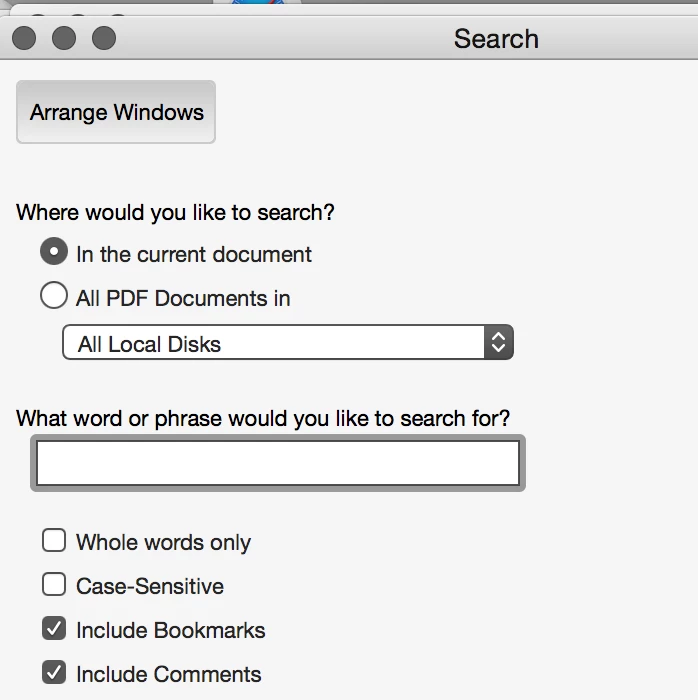
You have taken me a step further... thank you!!  I was missing the options in the dialog box that the .pdx provides.  So, I am now successful searching and finding the 5 documents in a particular file folder -- and the bookmarks are included.    Half-way home!

So this works as long as all users have Adobe Pro DC.  If others launch my pdf is just plain 'ole Acrobat (like what comes on computers for free) and I do a search, the results are not found.   Do you have a miracle in your other pocket?

Thank you!!!

Betty

Translate
Report
Community guidelines
Be kind and respectful, give credit to the original source of content, and search for duplicates before posting. Learn more
community guidelines
Community Expert ,
Jul 09, 2017 Jul 09, 2017

Betty, read the link I sent from the Help file. It's supposed to include the Bookmarks.

Are you including the catalog on the CD as instructed in the Help file?

Translate
Report
Community guidelines
Be kind and respectful, give credit to the original source of content, and search for duplicates before posting. Learn more
community guidelines
Community Beginner ,
Jul 10, 2017 Jul 10, 2017

I have read that help page no less than 20 times, and still could not peel back the layers sufficiently!  Thank you for pointing out the tree I missed in the forest!  The index, of COURSE!

All is well, and with careful attention my documents now have a functional index (well, at least 5 of them are!) 


Thank you so much, jane-e for your help... I sometimes get so focus on what doesn't work, I forget to see what does!

Betty

Translate
Report
Community guidelines
Be kind and respectful, give credit to the original source of content, and search for duplicates before posting. Learn more
community guidelines
Community Expert ,
Jul 11, 2017 Jul 11, 2017
LATEST

Oh, good news! So it is all working as expected now?

So glad to have helped, and it was good for me to refresh myself on Acrobat Indexes. They used to be required—and back then I knew them well—but that was many years ago.

Translate
Report
Community guidelines
Be kind and respectful, give credit to the original source of content, and search for duplicates before posting. Learn more
community guidelines