
Participating Frequently
October 28, 2022
Question

Inserting audio/video into PDF

  • October 28, 2022
  • 3 replies
  • 2078 views

So it seems to be possible in Acrobat Pro to insert video and audio into PDFs.

 

But when you do go through the "Rich Media" and then add a video file, it comes up with this message.
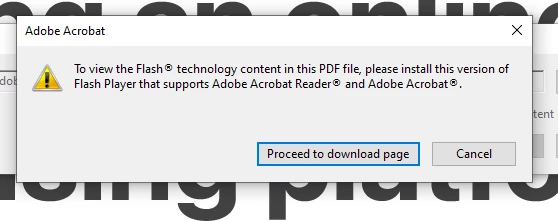
 

You can then just click 'cancel' and it seems to insert a placeholder for the video. Then if you save the PDF and open it, you get this message...

 

and Flash Player is no longer supported.


So can anyone tell me whether adding audio or video is possible at all? If it's not, surely these options should be removed from Acrobat...


This topic has been closed for replies.

3 replies

Participating Frequently
November 2, 2022

So can I just confirm once and for all...it is not possible to create a PDF with an embedded video that will actually play back, even though the latest version of Acrobat still allows me to embed?

I can get it to play back the audio of an embedded MP4 but it won't play the video for me.

Legend
October 28, 2022

What is the exact version of Acrobat (not "latest" please)?  Like 2016.987.12345?

Participating Frequently
October 28, 2022

2018.009.20050


Creative Cloud Desktop says it is up to date.

Participating Frequently
October 28, 2022

That doesn't mean it's the latest version. In fact, it's a pretty old version. The newest versions start with 2022.xxx...


I've tried running an update through the program...it keeps throwing some kind of licensing error. But I am a fully paid Adobe subscriber. Weird. Might try uninstalling and reloading.

Bevi Chagnon - PubCom.com
Legend
October 28, 2022

The PDF file format doesn't accomodate A/V at this time.

Plus, depending upon what software the end user launches to view the PDF, it most likely will have difficulty processing the A/V.


Best solution at this time: Place a still frame from the A/V clip in the PDF. Add a hyperlink that will launch the A/V clip in a browser (which handles A/V just fine) from a location on a website, possibly your own, YouTube, or a video hosting website like Vimeo.


|    Bevi Chagnon   |  Designer, Trainer, & Technologist for Accessible Documents ||    PubCom |    Classes & Books for Accessible InDesign, PDFs & MS Office |
Participating Frequently
October 28, 2022

Thanks. It seems very strange then that they would still have this option in the latest version of Acrobat then...given they also own what was Flash and the Flash Player. They should remove it to avoid confusion.


Just a question...what do you think would be the best way to create a Presentation that runs standalone on a tablet (iPad or Android tablet) that could use audio and video...other than Powerpoint or Keynote?


Flash Projectors used to be my way of doing this...where you could bundle everything up. But finding it very difficult to find a solution now.

try67
Community Expert
Community Expert
October 28, 2022

I don't think you have the latest version of Acrobat if you still see this option.