

Rocio_Lopez-Bretzlaff
Known Participant
February 22, 2021
Question

Is the Acrobat DC included in the Photography Plan, a TRY version or a FULL version?

  • February 22, 2021
  • 1 reply
  • 1576 views

I recently subscribed to the Photography Plan and in the apps listed in account for this plan it shows  Acrobat DC as being available to me.

Is this Acrobat DC version a full version or a try version?  And if a full version, it is included in this plan or not?  I own a version of Acrobat X Pro and that version satisfies my present needs to produce, comment and distribute PDFs, and I don't wish to uninstall it if the one being offered is only a TRY version that will require upon expiration a monthly payment.

Here is what is shows as being part of the Photography Plan. It is confusing, because in my account shows as Acrobat DC being available, but in the Plan description is not included.
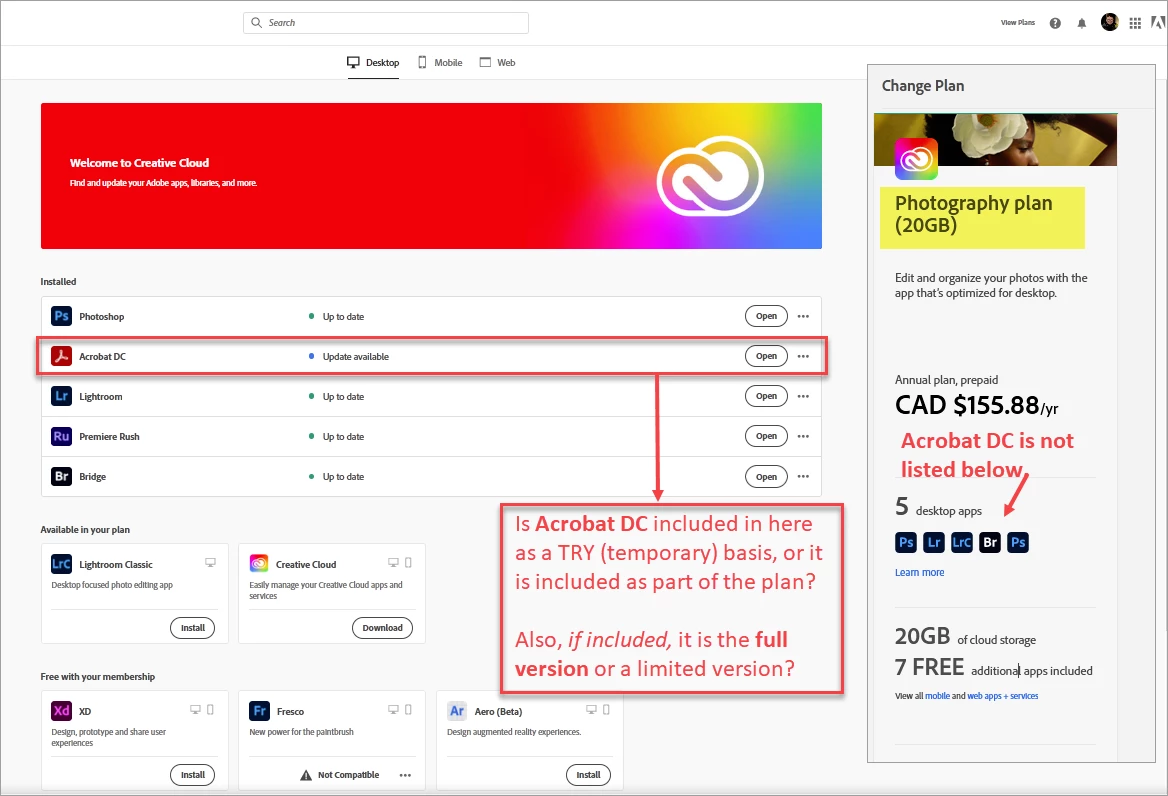
If someone can clarify this for me, I will be very appreciative!  Thank you and have a good start of the week!

Rocio LB


This topic has been closed for replies.

1 reply

Document Geek
Community Expert
Community Expert
February 22, 2021

Acrobat is not included in the Photography plan. The reason it's listed on th left is because it was installed on the computer at some point, and there is now an update available.


Likely, you have installed Adobe Reader. It's confusing because years ago, it used to be called"Acrobat Read" but then Adobe changed it to just "Acrobat" to distinguish it from "Reader." But a few years ago , they changed Reader to be renamed once again "Acrobat Reader." It's got the same UI as the full version of Acrobat, but with most of the features turned off. They've designed the UI so that it guides people toward upgrading to the full version.


Hope that helps! Sorry it's so confusing. It's by design. 😉

Rocio_Lopez-Bretzlaff
Known Participant
February 22, 2021

Thanks for your quick response. I agree with you about being 'Confusing by design'! 😉

Now, maybe you can tell what do I need to do to remove the Acobat DC from the apps 'installed' in my desktop. See capture again, and thank you in advance for your suggestion on resolving this issue.

Rocio LB


Rocío López-Bretzlaff
Document Geek
Community Expert
Community Expert
February 22, 2021

Click on the elipses and then choose "Uninstall."


But before you do that, check to make sure you're not uninstalling Acrobat Reader. If you remove it, what will you use to read PDFs? Just something to consider before you unistall it, as you'll be uninstalling Reader (even though it's titled "Acrobat" in the menu).


Honestly, I have a bunch of apps installed, and I just update them one at a time, if I need to. Good luck!