
Participant
March 19, 2019
Question

Is there a way to ungroup the text boxes in pdf forms?

  • March 19, 2019
  • 3 replies
  • 20055 views

Hi

I am facing the following issue while editing a pdf form.

When adding separate text boxes in a pdf form and saving it, the text boxes are getting grouped into a single text box when the form is reopened. Is there any way to avoid this grouping?

Screenshot 1: Separate text box (blue highlight)
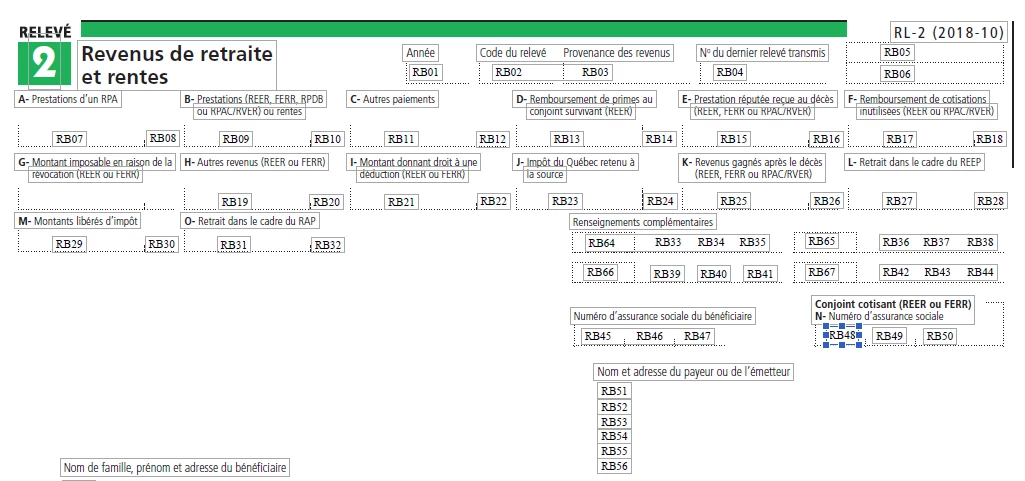
Screenshot 2: text boxes grouped (blue highlight)
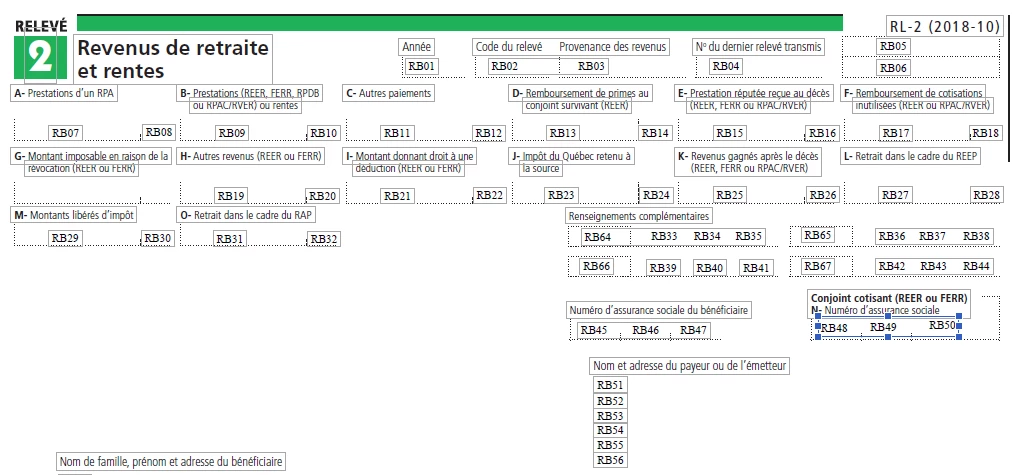
Post moved from Commenting & Collaboration to PDF Forms [Mod]

This topic has been closed for replies.

3 replies

Participant
April 9, 2022

Just move the form feilds around to clear around the clubbed text and it and it will ungroup to independant text blocks again.  pdf forms need proper spacing. you can tweak the layout and space clearance in the settings.

Participant
November 23, 2022

Thanks, that's a nice tip. I've been getting better at using the program. The grouping or clubbing (I don't know what it's called) can still be a problem. I've noticed that the fields seem to be a bit "attracted" to each other - kinda like magnets or a "snap to guides" click. It's a great tool

Participant
April 2, 2019

Does anyone besides me think that automatically and irreversibly merging text boxes that are near each other into one large text box is an assinine programming decision? I am continually baffled at how difficult Adobe has made it to edit previously designed forms and how Adobe has made Acrobat work counter-intuitively to almost every common convention in graphic design applications (even their own). I don't want separate text boxes merged for me--you can give me the option, but it should not be the default! We need a select objects tool that can select across layers and move all text, graphic, and field objects at the same time. Control + drag (or option + drag on a Mac) should copy the object as you drag it. I could keep going, but such conventions are almost universal across applications (at least in the Mac world). What gives Adobe?!

Legend
April 3, 2019

It's a weird thing to do, but pretty much inevitable. It comes from the design of PDF, not a programming decision.


PDF files DO NOT CONTAIN TEXT BOXES for the ordinary text. It's just text. To make editing "easier" Acrobat analyses the page, and guesses what text boxes would be convenient. When you finish editing, there are no more boxes any more, only the text. So next time, it will analyse and see only one box where two were joined.

To add text box descriptions to PDF would change the rules of PDF, and Adobe don't make those rules any more.

The problem here is expectation. People see an editor in PDF and assume that editing PDF is a normal, simple process, rather than a desperate last resort. Who creates this expectation? Adobe marketing, unfortunately.

SquidTeeth
Participating Frequently
July 31, 2020

I can understand that then need to join text boxes is a convention of the final output, but there should be a "Finish and export" option that leaves you with a editable master file and a shareable  (a la .PSD file and flattened .JPG).   Also the inability to group together a text box and it's associated text field, for positioning around the screen.

Bernd Alheit
Community Expert
Community Expert
March 19, 2019

Not possible.

Participant
March 20, 2019

Hi Bernd

We tried the same with another PDF form but the text boxes are not getting grouped. Not sure why. Do you have any insight on this?

Screen 1 - Separate text box (blue highlight)

Screen 2 - Text box is ungrouped even after saving and reopening the form

Bernd Alheit
Community Expert
Community Expert
March 21, 2019

Thanks Bernd.

Alternately, we tried to include the form fields instead of text boxes. Alignment issues were resolved but the size of the pdf has increase to 4 MB. Is there an option to reduce the file size to 1 MB?


You can try the optimizer in Adobe Acrobat Pro.