
Participant
March 6, 2018
Answered

Issue: open Acrobat CC2018: sticky note are large

  • March 6, 2018
  • 1 reply
  • 616 views

Issue: open Acrobat CC2018: sticky note are large and hard to determine where they are pointed to. In additional each of the notes when opened fill the file. Is there a preference to set so the note bubble appear smaller and point to the correct area of the comment along with not having to size down each note .... especially annoying since some files might have 10 sticky note bubbles

tootles
This topic has been closed for replies.
Correct answer Document Geek

Try Creating a comment summary. You can set it to draw lines pointing specifically .

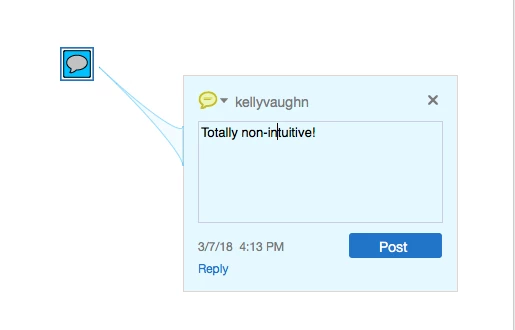
Or, try opening the comment pop-up by double clicking on it. Then hover over either icon or the pop-up. You'll see a pointer line connecting the two, but ONLY when you hover over one of them. It helps to make the comment darker. Like so:

1 reply

Document Geek
Community Expert
Document GeekCommunity ExpertCorrect answer
Community Expert
March 7, 2018

Try Creating a comment summary. You can set it to draw lines pointing specifically .

Or, try opening the comment pop-up by double clicking on it. Then hover over either icon or the pop-up. You'll see a pointer line connecting the two, but ONLY when you hover over one of them. It helps to make the comment darker. Like so:

msdworksAuthor
Participant
March 7, 2018

it would be ok if it only opened as small as that but the sticky opens full on the file and overwhelms the file. That means I have to resize each. I've looked around to see if there is a preference that controls the opening of the sticky note, however, I can't seem to find any information online.