
Participant
September 2, 2021
Question

Jagged font when I covert PDF to image (tiff or jpg etc.)

  • September 2, 2021
  • 4 replies
  • 5028 views

Hi,


When I want to export a PDF to image like TIFF, JPG or PNG then the font all the time is jagged, hairy.

File > Export To > Image > Tiff etc. Chanegd all of the setting, resolutions but the same. In the original PDF the fonts are good.
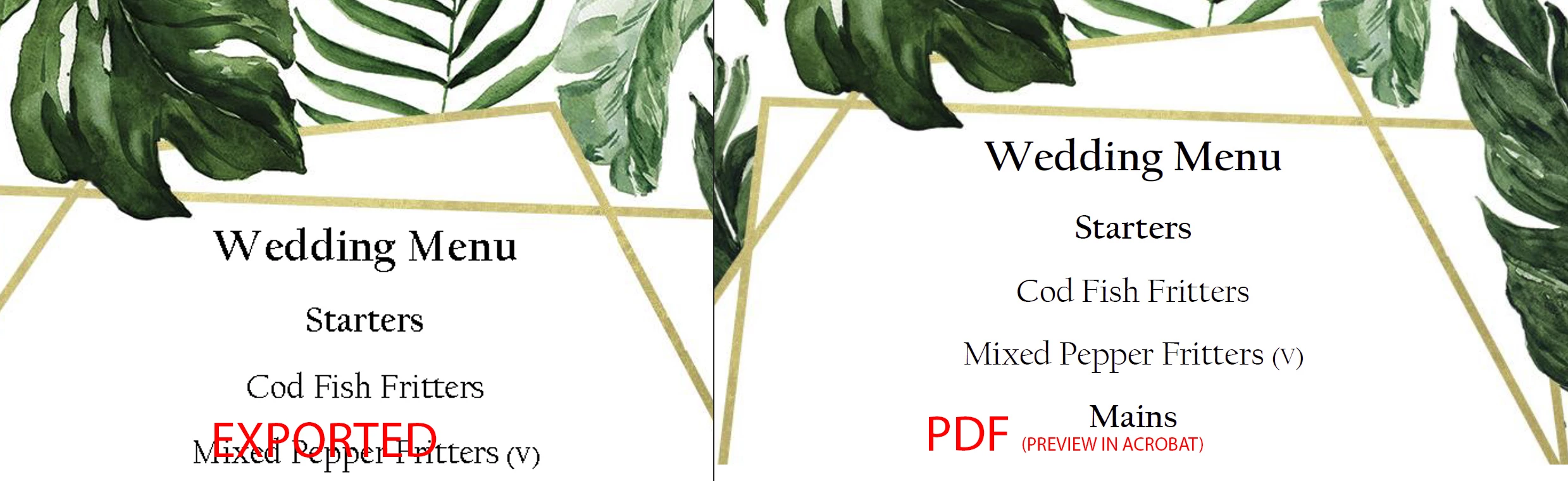
 

What can I do in order to get smooth font after exported? 

My colleague's  Adobe acrobat pro dc is working fine.

4 replies

bread_first
Participating Frequently
September 8, 2023

Hello,


I have experienced the same issue converting an 80pg pdf to jpegs. Changing the resolution to 600dpi makes no difference. The text and vector lines still appear jaggered.

As someone who also doesn't have time to open the file in Ps or Ai or InDesign, I found a quick work around for my needs. Crzy that an online engine can do what a paid subscription to Adobe CC can't, but here we are.

I needed images exported for case study purposes. A quick and easy solution. I Googled "PDF to image" and found this free online engine: pdftoimage.com

You don't have control over the resolution, but a tabloid-sized sheet output at 3400px x 2200px at 200ppi which was perfect for my needs. Anti-alisaing on these exports is perfect (art optimized I would guess). Now I don't recommend this for sensitive files, but for documents already in public circulation you should be fine.

Hope this helps in the meantime.

gary_sc
Community Expert
Community Expert
September 8, 2023

ignore

Brad @ Roaring Mouse
Community Expert
Community Expert
September 3, 2021

I'm curious as to what version of Acrobat your colleague has. Unless they exported at a higher resolution (600 ppi), there hasn't been anti-aliasing in any version I have worked with.

As far as you are concerned, you should also export as 600 dpi. The "standard" 300 dpi, which is good for images for high quality print, does not work well for type, as you have noticed. Since you are saving as JPEG anyway, your design has a lot of white space so the resulting files won't be much bigger.

gary_sc
Community Expert
Community Expert
September 2, 2021

You need to go into your preferences and tell Acrobat what resolution you want the TIF to be in. Otherwise it will do Default which may not be what you want (and apparently is not).


The screenshot below should show the steps. Just note that the greater the resolution, the larger the file size will be. It's one or the other, you cannot have both. 300 is probably a good number for what you want/are doing if you're printing to a laserwriter or for a quality printing. For looking at on the screen or printing via an inkjet, 150 ppi is fine.


Good luck!


gary_sc
Community Expert
Community Expert
September 2, 2021

Oh, I forgot to add this screenshot: you need to scroll until you see "TIFF" format and then click on the "Edit Settings"

Participant
September 3, 2021

Thank you, but as I mentioned I tried this and same result. 

I tried with the 300 dpi, still terrible the font.


Here there is some problem generally with the expor. I had this problem in the illustrator but there I changed the export settings (Anti-aliasing to Art optimized from Type optimezed ) and after this all of my text is great. 

Legend
September 2, 2021

Not a direct answer but a tip: if you happen to have Photoshop, it does a much better job.

Participant
September 2, 2021

Thank you for your reply. I know and illustrator also does a better job but offten haven't got time to open it etc. especially when the PDF has 10-80 pages and needed image file.