
Inspiring
November 5, 2021
Question

JavaScript find text & create field
  • November 5, 2021
  • 2 replies
  • 4245 views

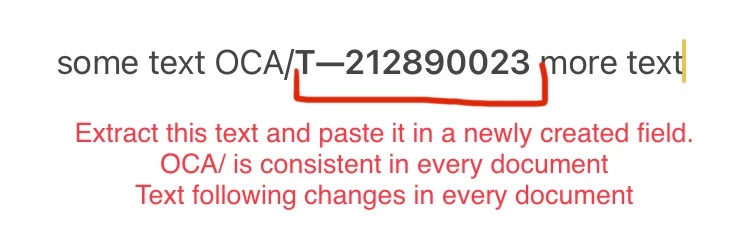
I have a bigger JavaScript task but I want to see if I can do the following before going further.

  • FIND text “OCA/“ (no quotes)
  • COPY the text that follows “OCA/“ up until and including the next SPACE (if including the space is a problem that’s not necessary)
  • Create a field that has the copied text in it (field can be labeled anything)


A visual is attached as well. Thank you in advance!


This topic has been closed for replies.

2 replies

dpoagAuthor
Inspiring
November 11, 2021

I was greatful to receive the below sample code from an external professional. Any thoughts on whether this gets me closer to a solution? I would need to determine how the two sets of suggested codes relate and if they are placed in the same "module"? My goal is to automate this task using an Acrobat menu button or Custom Action once I get the code established. I've attached an updated screenshot. Thank you for any additional feedback that may be offered!


Code:
  <div id="string">
   Some text of any length here OCA/T--212890023 and some more text here.
 </div>

JavaScript...

Code:
<script>
(function(d) {
   'use strict';
    var str = d.getElementById( 'string' ).textContent,
      start = str.indexOf('OCA/'),
   required = str.substring( start + 4, start + 15 ) + ' MISC';

   console.log( required );

}(document));
</script>
try67
Community Expert
Community Expert
November 11, 2021

No, not at all. This looks like JS written for a web-page. The commands for JS in a PDF file are completely different, although the core syntax is (for the most part) the same.

dpoagAuthor
Inspiring
November 6, 2021

I would like to modify my post. Thank you in advance:


I have a bigger JavaScript task but I want to see if I can do the following before going further.

  • FIND text “OCA/“ (no quotes)
  • COPY the text that follows “OCA/“ up until and including the next SPACE (if including the space is a problem that’s not necessary)
  • Create a field that has the copied text in it (field can be labeled anything)
  • Save as: found/copied text MISC (the save location will always be the same and the word MISC is merely tagged on to the end of the found / copied text)


A visual is attached as well.

dpoagAuthor
Inspiring
November 6, 2021

Another important detail I should've added from the beginning

  • the text following OCA/ will always be 12 characters (not including the space following)


Thank you!

try67
Community Expert
Community Expert
November 7, 2021

Yes, this is all possible, but it requires the development of a custom-made script, which is not a trivial task, as well as installing a script file on the local computer of each user who will be using it.

If this is something you want to develop on your own we can help with some pointers on how to implement it.
If you're looking for a ready-made solution you can always hire a professional to do it for you. I've created many similar tools in the past and could do the same for you (for a fee, of course). You can contact me privately via [try6767 at gmail.com] to discuss it further.