
OsakaWebbie
Inspiring
March 17, 2017
Answered

Keep comment list open, or hotkey?

  • March 17, 2017
  • 1 reply
  • 10489 views

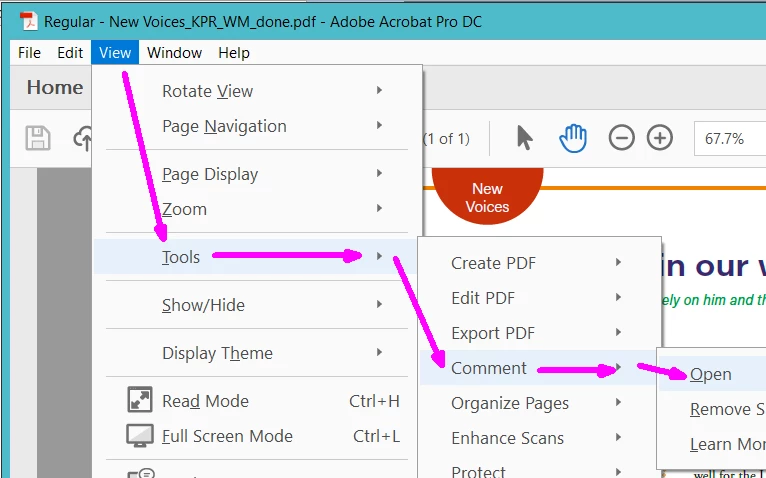
Can I get the Comments list to be open by default whenever there are comments in a document (or all the time, if conditional is too hard)? I open lots of documents that contain comments, and I always want to see the list, but it's annoying to always have to select View -> Tools -> Comment -> Open every time.

Or at least is there a way to set a hotkey for the opening of that pane? That would be better than a 4-layer-deep menu item.
This topic has been closed for replies.
Correct answer try67

Which version were you expecting?

Anyway, if "look under Tools" means the menu item View -> Tools, then that's what I do now, but it gets tiresome:


I meant the Tools button next to Home, just above the toolbar and below the menu.

1 reply

try67
Community Expert
Community Expert
March 17, 2017

I don't think so, but why are you using this long route? Simply click the Comment button at the top-right hand side of the window and the panel will open, with the comments list at the bottom of it.

OsakaWebbie
Inspiring
March 17, 2017

There is no Comment button that I can find. This is a screenshot of Acrobat right after opening one of the files that has comments I want to read (each of those yellow highlights represents a comment from the proofreaders). What button are you referring to?

try67
Community Expert
try67Community ExpertCorrect answer
Community Expert
March 17, 2017

Which version were you expecting?

Anyway, if "look under Tools" means the menu item View -> Tools, then that's what I do now, but it gets tiresome:


I meant the Tools button next to Home, just above the toolbar and below the menu.