bill1gill2
Participant
March 7, 2018
Answered

Language for numbers locked in Arabic

  • March 7, 2018
  • 10 replies
  • 74626 views

I'm working with Adobe Acrobat Pro DC. When editing documents, the default characters for numbers always give me Arabic numerals despite my English text. Even if I cut and paste standard English numerals, the result is having them converted into Arabic numerals. Hopefully there is a quick fix.

Regards,

Will

Correct answer Zaid Al Hilali

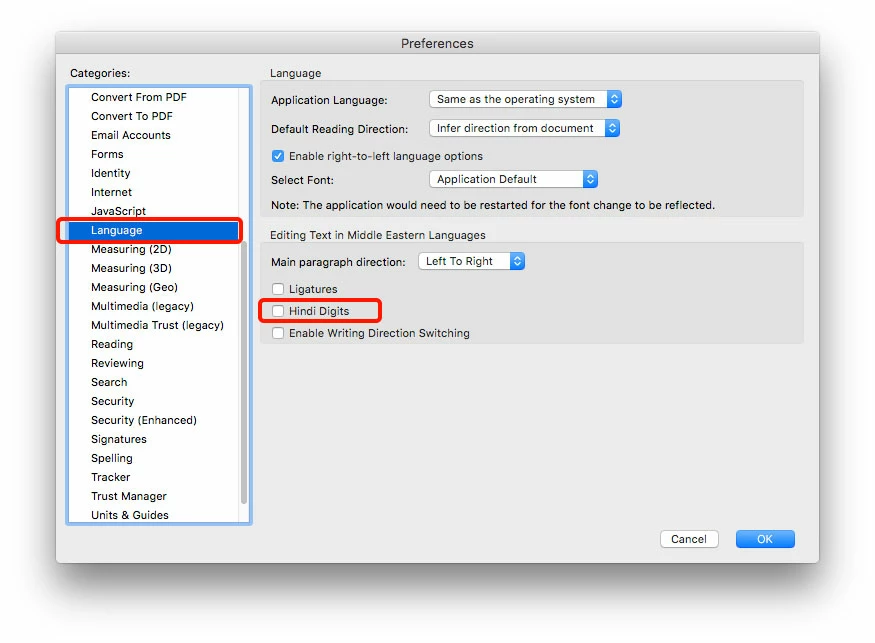
You may want to turn off (Uncheck) Hindi Digits in the Preferences > Language section. Let me know if this works for you.

10 replies

Participant
February 13, 2026

The reason Acrobat has such a special place in my heart is that this problem is still there, in a fresh installation, SEVEN YEARS later. No other developer puts so much effort into annoying their customer base. Bravo.

Warning: this post may contain sarcasm.

Participant
May 19, 2025

Worked for me too- Many thanks!

Participant
April 15, 2024

This worked for me, too. Thank you!! :O)

Participant
October 4, 2024

Thanks for the solution, worked for me too

Participant
February 25, 2024

Thank you, Zaid, very helpful

Inspiring
February 9, 2024

2024 and it's still there. Pathetic.

Participant
October 24, 2023

Thank you very much!!! I can fix it.


djuncheg117156386
Inspiring
July 14, 2023

Same thing in 2023. Nobody fix this for years. 

All scanning work in Acrobat is unbelievably bad. Is this software written for some kind of disgusting application contest?
6 years after this post - the same problem with wrong digits and the solution with disabling Hindi language helps to return normal digits but does not solve the problem - it is worth to me to correct any digit in the block as all kerning moves away, i.e. it is still impossible to correct digit blocks.

Participant
March 27, 2023

Thank you! I'm having this problem years after this question was posted. This simple fix still works on Windows 11. Thanks so much!


Participant
November 18, 2022

Thank you! it worked. Big help in editing PDF files.

Zaid Al Hilali
Community Expert
Zaid Al HilaliCommunity ExpertCorrect answer
Community Expert
March 7, 2018

You may want to turn off (Uncheck) Hindi Digits in the Preferences > Language section. Let me know if this works for you.

Participant
August 8, 2020

Thanks so much. Your suggestion worked