
Participant
February 7, 2025
Answered

Latest version of Adobe Acrobat not searching all text

  • February 7, 2025
  • 1 reply
  • 855 views

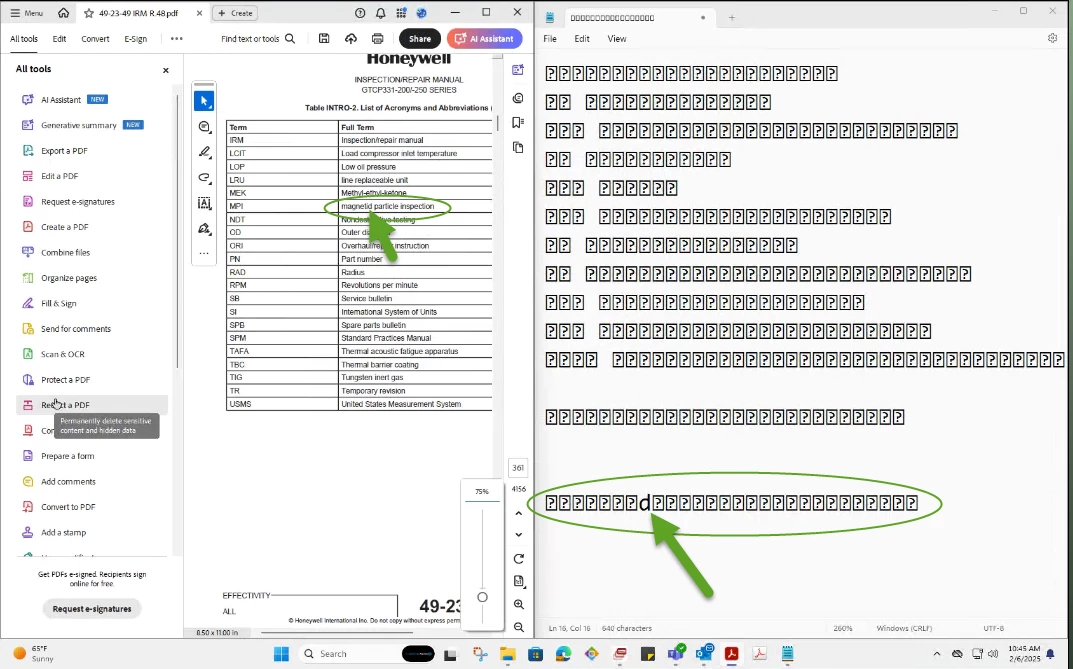
My user has Adobe Acrobat Pro.  Up until the 24.005.20399 update, (update on this machine on 2/3/2025), she was able to search this document completely.  Now, some text (in tables) in this same document is no longer searchable.  When I copy the text in question and paste it in notepad, it is nothing but unprintable characters.  When I edit the text (seen below), then copy the section I edited, it shows my edit with the correct character, but all the rest is still unsearchable due to the characters being "weird".  Other sections of text are still searchable.  Note: the text "looks" normal on the pdf, but copying the text and pasting it shows the abberation. Again, this is new behavior since the 24.005.20399 update.


Correct answer Tariq Ahmad

Hi @17834292, 


Thank you for reaching out with your question and sharing your observations. 

Please ensure your copy of Acrobat is updated, to check for updates, launch Acrobat > Help > Check For Updates

If the same document in question was working prior to the latest update, I have some questions:

  • Was the document in question edited by Acrobat or other apps?
  •  Was it flattened? 

If there were no changes made to the document, however, this issue started after the update, please share the file with us and let us know when it did work as expected last time. 

If the document is sensitive and want to share it privately, click on the Envelope icon at the top right corner.


~Tariq

1 reply

MikelKlink
Participating Frequently
February 7, 2025

Whenever copy&paste produces such a garbled output, that usually is caused by insufficient information on which glyphs correspond to which characters. In such situations text extractions has to resort to educated guesses. Apparently these guesses have been subject to change recently making them worse for your documents (while likely improving them for others).


Tariq AhmadCommunity ManagerCorrect answer
Community Manager
March 7, 2025

Hi @17834292, 


Thank you for reaching out with your question and sharing your observations. 

Please ensure your copy of Acrobat is updated, to check for updates, launch Acrobat > Help > Check For Updates

If the same document in question was working prior to the latest update, I have some questions:

  • Was the document in question edited by Acrobat or other apps?
  •  Was it flattened? 

If there were no changes made to the document, however, this issue started after the update, please share the file with us and let us know when it did work as expected last time. 

If the document is sensitive and want to share it privately, click on the Envelope icon at the top right corner.


~Tariq

Participant
March 7, 2025

Thank you, I don't know the provenance of this docuemnt, and I found out today that it is the only one exhibiting this behavior.  As it is a sensitive document, I cannot forward it ot you.  Please consider the issue closed.