

Letters å, ä and ö disappears when copying text from Adobe Acrobat (Reader and Acrobat Pro)
A couple of weeks ago a problem has started when I copy text from a PDF-file in Adobe Acrobat (Reader and Acrobat Pro). The swedish letters å, ä and ö disappears when I paste the text into InDesign, Mac Text Editor or any other text app. It leaves a blank space where those letters should be. It does not matter if the file is produced in Acrobat or if I open a PDF made in InDesign. The fonts do contain the letters å, ä and ö, because it's no problem when working in InDesign AND the letters are VISIBLE when looking at the file in Acrobat. Making a print file also works – the å, ä, ö letters are included.
It feels that the problem must be in Acrobat since when I open exactly the same PDF-file in Mac OS preview app and copy the same text it works! At home I use a Mac Pro (late 2013) and Mac OS Big Sur (11.4) and at work I use an iMac (Retina 5K, 27-inch, 2019) and Mac OS Mojave (10.14.6). Same problem despite different Mac computers and Mac OS and different versions of InDesign. But the Acrobat versions are the same, 2021.005.20048
I enclose a screenshot from Mac Text Editor to visualize how it looks. Hoping for a solution.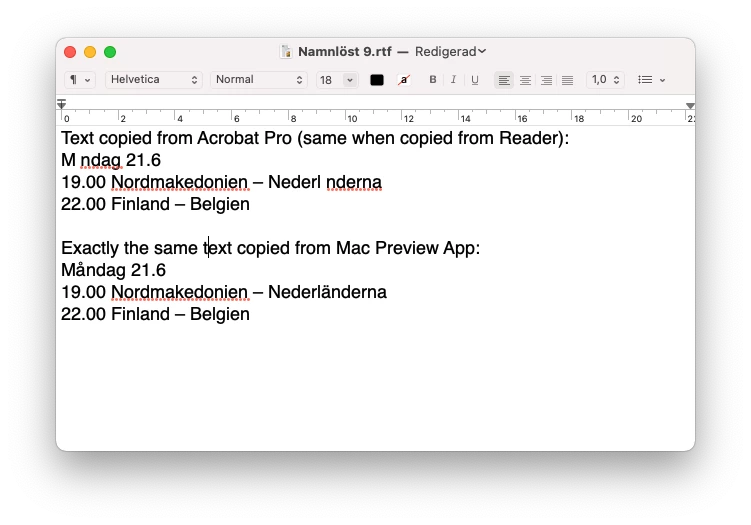


 AdChoices