

jayaflir
Inspiring
February 12, 2020
Answered

License expired error but license has not expired

  • February 12, 2020
  • 1 reply
  • 14245 views

Hello. I have a license for Adobe Acrobat Standard DC. In Microsoft Word, when I try to Save as Adobe PDF, the following message appears:
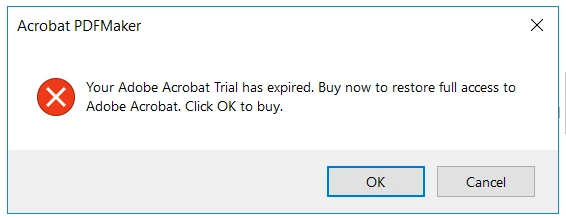
Then, just for fun to see what happens, when I click OK, the Plans and pricing page appears, including this:

Well, I have a license for Acrobat Standard DC, I have it open, and I am signed in.

Please advise.

Thank you.

This topic has been closed for replies.
Correct answer jayaflir

Thank you, Amal.

After I reported the issue, I uploaded the document to our company's SharePoint (well, one of them), opened the document in the Word Desktop, and was able to Save as Adobe PDF as expected. Also, today (Thursday), I can open the document and Save as Adobe PDF as expected. At some point yesterday, I sign out and signed back in. I don't think I rebooted the computer at any time since I experienced the issue. Overnight, Adobe Acrobat Standard DC was closed and, again, this morning, it seems to be working as expected.

Thanks, again.

1 reply

Amal.
Community Manager
Community Manager
February 12, 2020

Hi Jaya,


We are sorry for the trouble. AS described you are not able to save the pdf and getting the error message 'Trial has expired'


We have checked the account details with the email you are using on this community and found that you have an active license for Adobe Acrobat Standard DC


Please sign out of the application, reboot the computer and restart the application and sign in with the Adobe ID (Email used for Adobe) and check.


You may also refer to a similar discussion (https://community.adobe.com/t5/acrobat/why-am-i-getting-a-your-trial-has-has-expired-message-on-a-fresh-install-of-a-paid-service/td-p/9433323?page=1) and see if that helps .


Let us know how it goes


Regards

Amal


jayaflir
jayaflirAuthorCorrect answer
Inspiring
February 13, 2020

Thank you, Amal.

After I reported the issue, I uploaded the document to our company's SharePoint (well, one of them), opened the document in the Word Desktop, and was able to Save as Adobe PDF as expected. Also, today (Thursday), I can open the document and Save as Adobe PDF as expected. At some point yesterday, I sign out and signed back in. I don't think I rebooted the computer at any time since I experienced the issue. Overnight, Adobe Acrobat Standard DC was closed and, again, this morning, it seems to be working as expected.

Thanks, again.

Amal.
Community Manager
Community Manager
March 3, 2020

Hi there 


We are glad to hear that the issue got fixed. 


Feel free to contact us for any further assistance required in the future.


Regards

Amal