
Andreas Jansson
Inspiring
December 5, 2017
Answered

Line spacing in Acrobat Pro - no indication of unit!

  • December 5, 2017
  • 1 reply
  • 3135 views

When opening a PDF in edit mode, the line spacing for the selected text, or place of the cursor, is displayed, but what does it mean? There is no indication of unit at all.

My best guess is that it's a factor to multiply the font size with, so that with a font size* of 7pt a line spacing of 1,36 would translate to 9,52pt (7 * 1,36 ).

*(The maximum font size of the line?)
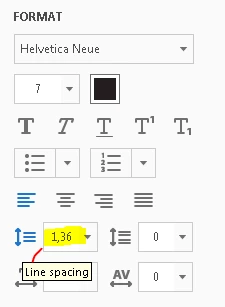
Back in school otherwise correct answers were marked as wrong if the unit was missing. I've seen other people asking this question too, but either with no answer or guesses such as the unit "em", which doesn't seem to be the case(?)

This topic has been closed for replies.
Correct answer Test Screen Name

The size in points of a font, by the way, is quite well defined in typographic terms, and is distinct from other useful measurements like ascent, descent, or maximum box height. It is, rather, the design size that the designer felt (if they did their job right) would look right as a default line spacing, and generally won’t overset.

1 reply

Legend
December 5, 2017

I observe there is also no unit for font size, and you do not complain if that, either thinking that font size is a unitless code or knowing most people work in points. So my guess would be the same unit as that. Let us know if you find out.

Test Screen NameCorrect answer
Legend
December 5, 2017

The size in points of a font, by the way, is quite well defined in typographic terms, and is distinct from other useful measurements like ascent, descent, or maximum box height. It is, rather, the design size that the designer felt (if they did their job right) would look right as a default line spacing, and generally won’t overset.

Participant
April 25, 2020

Responders, you have no idea of the frustration caused,when ordinary mortals ask questions to get techically correct but unhelpful answers from supreme beings.


OK, so if the paragraph settings are in points and the grid is in points. Why is it so difficult on a form, to align the text with the field beside it? 


In previous versions of Acrobat each peice of text was was a seperate text box and could be easily moved around (come back Life Cycle Designer all is forgiven).


The curent trend is to place all text in a large paragraph which is incredibly difficult to edit or make changes to later.


Where in the vast realm of the Adobe Cloud is there a clear explanation, online or in a textbook, that covers the full functions for the formatting box and the advanced formatting options, with some practical advice on how to use it to best effect.


I don't  have the time to take a degree in Acrobat or a masters in typesetting, nor do I have the approved Masonic handshake, I just want to build a good looking form by Monday.

yours sincerely........Frustrated Mortal