Exit
  • Global community
    • Language:
      • Deutsch
      • English
      • Español
      • Français
      • Português
  • 日本語コミュニティ
  • 한국 커뮤니티
0

Link Duplication

Community Beginner ,
May 12, 2022 May 12, 2022

We use PDFs for agendas for our City Council members to navigate meeting info easily. In the past, we had a button added to each page of the 100+ documents to return to page 1, with a table of contents so they could jump between topics. Now, the "Return to Agenda" buttons do not work on iOS devices. I understand buttons can be finicky to use on non-Adobe readers/browers, but links work perfectly fine in Safari. I attempted to create a header with a link, but can't seem to find a way to use a link in a header. I also tried the "Duplicate for all pages" with a link, like we used on the buttons, but that right click option is not displayed for links. Is there an easy way to duplicate a link between pages? I do not want to copy and paste this thing 100 times. I have access to Acrobat Pro 2020, and X Pro. Thank you in advance!


On this topic, I did find this post from 2017, but no mention of adding a link to all pages: 
https://community.adobe.com/t5/acrobat-discussions/how-to-duplicate-links-buttons-in-acrobat-dc-if-t...


TOPICS
Create PDFs , Edit and convert PDFs , General troubleshooting
2.8K
Translate
Report
Community guidelines
Be kind and respectful, give credit to the original source of content, and search for duplicates before posting. Learn more
community guidelines
2 ACCEPTED SOLUTIONS
Community Expert ,
May 13, 2022 May 13, 2022

Hi,

Here is a script where you will be able to modify the parameters to suit your request.

var firstPage=1; // First page with the header
var lastPage=this.numPages; // Last page with the header
var toGo=1; // Page number to go
var topMargin=10; // Top margin of the header
var leftMargin=10; // Left margin of the header
var rightMargin=10; // Right margin of the header
var linkHeight=50; // Height of the header
//
for (var p=firstPage-1; p<lastPage; p++) {
	var cropBox=this.getPageBox("Crop", p);
	var header=this.addLink(p, [leftMargin,cropBox[1]-topMargin,cropBox[2]-rightMargin,cropBox[1]-topMargin-linkHeight]);
	header.setAction("this.pageNum="+(toGo-1));
}

@+


View solution in original post

Translate
Report
Community guidelines
Be kind and respectful, give credit to the original source of content, and search for duplicates before posting. Learn more
community guidelines
Community Expert ,
May 16, 2022 May 16, 2022

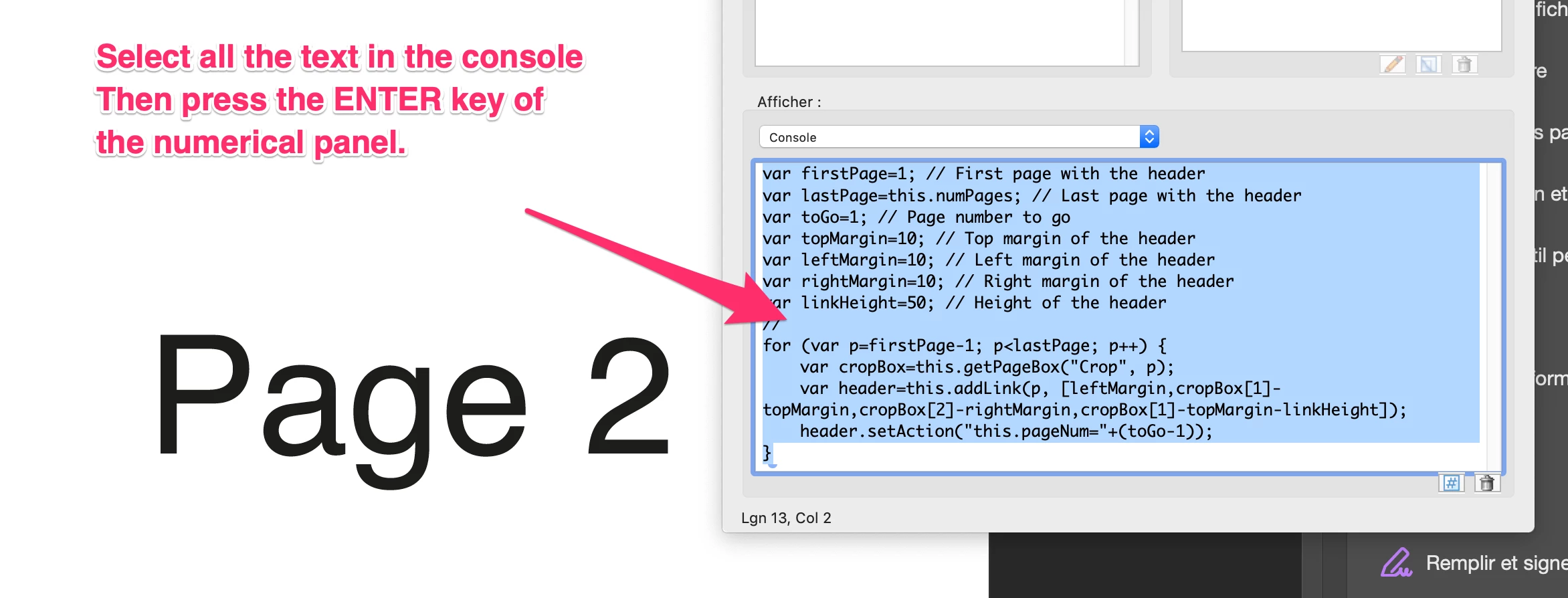
As Bernd told:

Capture_d’écran_2022-05-16_à_18_30_04.pngCapture_d’écran_2022-05-16_à_18_30_26.png

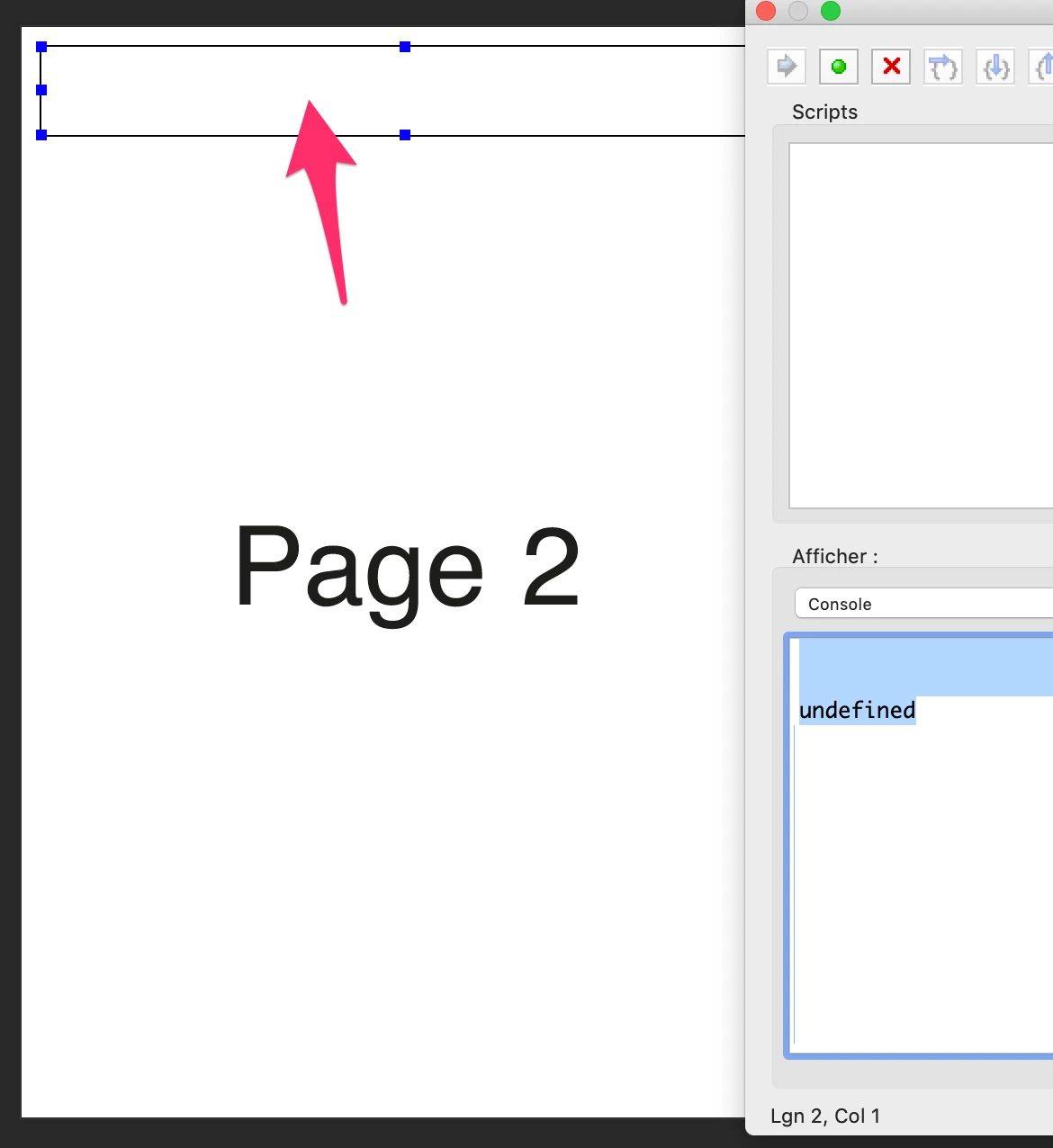
You will get a link area at the to of each page.

@+

View solution in original post

Translate
Report
Community guidelines
Be kind and respectful, give credit to the original source of content, and search for duplicates before posting. Learn more
community guidelines
Community Expert ,
May 12, 2022 May 12, 2022

What actions does you use at the buttons.

Translate
Report
Community guidelines
Be kind and respectful, give credit to the original source of content, and search for duplicates before posting. Learn more
community guidelines
Community Beginner ,
May 16, 2022 May 16, 2022

Sorry, I was out of the office for a bit. Simply going back to the first page! 


Translate
Report
Community guidelines
Be kind and respectful, give credit to the original source of content, and search for duplicates before posting. Learn more
community guidelines
Community Expert ,
May 13, 2022 May 13, 2022

Hi,

Here is a script where you will be able to modify the parameters to suit your request.

var firstPage=1; // First page with the header
var lastPage=this.numPages; // Last page with the header
var toGo=1; // Page number to go
var topMargin=10; // Top margin of the header
var leftMargin=10; // Left margin of the header
var rightMargin=10; // Right margin of the header
var linkHeight=50; // Height of the header
//
for (var p=firstPage-1; p<lastPage; p++) {
	var cropBox=this.getPageBox("Crop", p);
	var header=this.addLink(p, [leftMargin,cropBox[1]-topMargin,cropBox[2]-rightMargin,cropBox[1]-topMargin-linkHeight]);
	header.setAction("this.pageNum="+(toGo-1));
}

@+


Translate
Report
Community guidelines
Be kind and respectful, give credit to the original source of content, and search for duplicates before posting. Learn more
community guidelines
Community Beginner ,
May 16, 2022 May 16, 2022

Incredible. I'm a novice with creating PDFs. I simply need the button to go to the first page. Do I add this to the properties of a button, I suppose? 

Translate
Report
Community guidelines
Be kind and respectful, give credit to the original source of content, and search for duplicates before posting. Learn more
community guidelines
Community Expert ,
May 16, 2022 May 16, 2022

Hi,

No, you copy/paste this script in the empty console, then you "Select All" (ctrl A) and press the ENTER key of the numerical panel.

This script will not generate a field but a link area at the top of each page.

@+

Translate
Report
Community guidelines
Be kind and respectful, give credit to the original source of content, and search for duplicates before posting. Learn more
community guidelines
Community Beginner ,
May 16, 2022 May 16, 2022

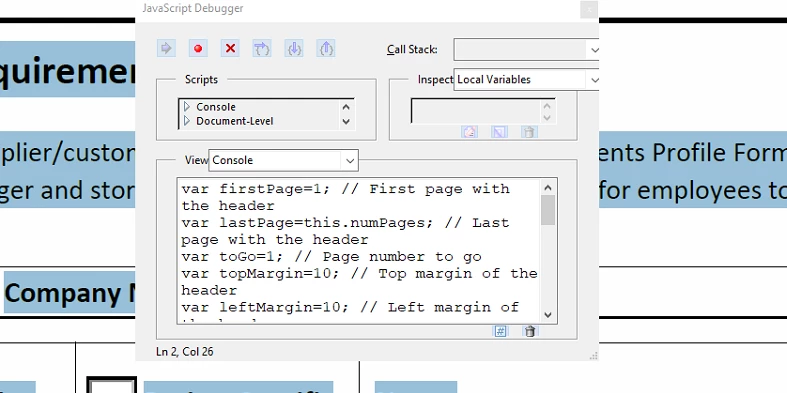
First of all, thank you for helping and writing this code! I see the notes, but I'm unable to get it to function. I entered the code in the box, per the screenshot, highlighted all on the document, but no change. Do I need to modify the code further for this to function? I'm not much of a programmer... 


Screenshot 2022-05-16 105334.png

Translate
Report
Community guidelines
Be kind and respectful, give credit to the original source of content, and search for duplicates before posting. Learn more
community guidelines
Community Expert ,
May 16, 2022 May 16, 2022

Select all of the script.

Translate
Report
Community guidelines
Be kind and respectful, give credit to the original source of content, and search for duplicates before posting. Learn more
community guidelines
Community Expert ,
May 16, 2022 May 16, 2022

You pressed Ctrl+A outside the Console window, so it selected the text of the document behind it.

You must click within the text area at the bottom of the console, then press Ctrl+A, then Ctrl+Enter to run it.

Translate
Report
Community guidelines
Be kind and respectful, give credit to the original source of content, and search for duplicates before posting. Learn more
community guidelines
Community Expert ,
May 16, 2022 May 16, 2022

As Bernd told:

Capture_d’écran_2022-05-16_à_18_30_04.pngCapture_d’écran_2022-05-16_à_18_30_26.png

You will get a link area at the to of each page.

@+

Translate
Report
Community guidelines
Be kind and respectful, give credit to the original source of content, and search for duplicates before posting. Learn more
community guidelines
Community Beginner ,
May 16, 2022 May 16, 2022
LATEST

Beautiful. Now I can add a centered header that says "Tap the top of each page to return to the Agenda." Thank you all for the help, I was scatching my head on this for a while! 

Translate
Report
Community guidelines
Be kind and respectful, give credit to the original source of content, and search for duplicates before posting. Learn more
community guidelines