
Participating Frequently
May 23, 2024
Answered

Links in PDF disappears in browser after Chrome update!

  • May 23, 2024
  • 7 replies
  • 12084 views

We just found that links in PDF files are not clickable within the browser after chrome update v.125. For those that have v.124 the links do still work and directs the user to the correct page.


We have hundreds of PDF published that refers to each other with common url links. Previolsy you could click the link within the browser and it open the target PDF. Today we found that the links have dissapeared, if you have Chrome v125. You cannot click them!


But if you download the file and open it in Adobe Reader/Pro the links are there and points to the target.


We just as well got the indication that this problem as well appears in Edge. Is this a known bugg?
This topic has been closed for replies.
Correct answer JR Boulay

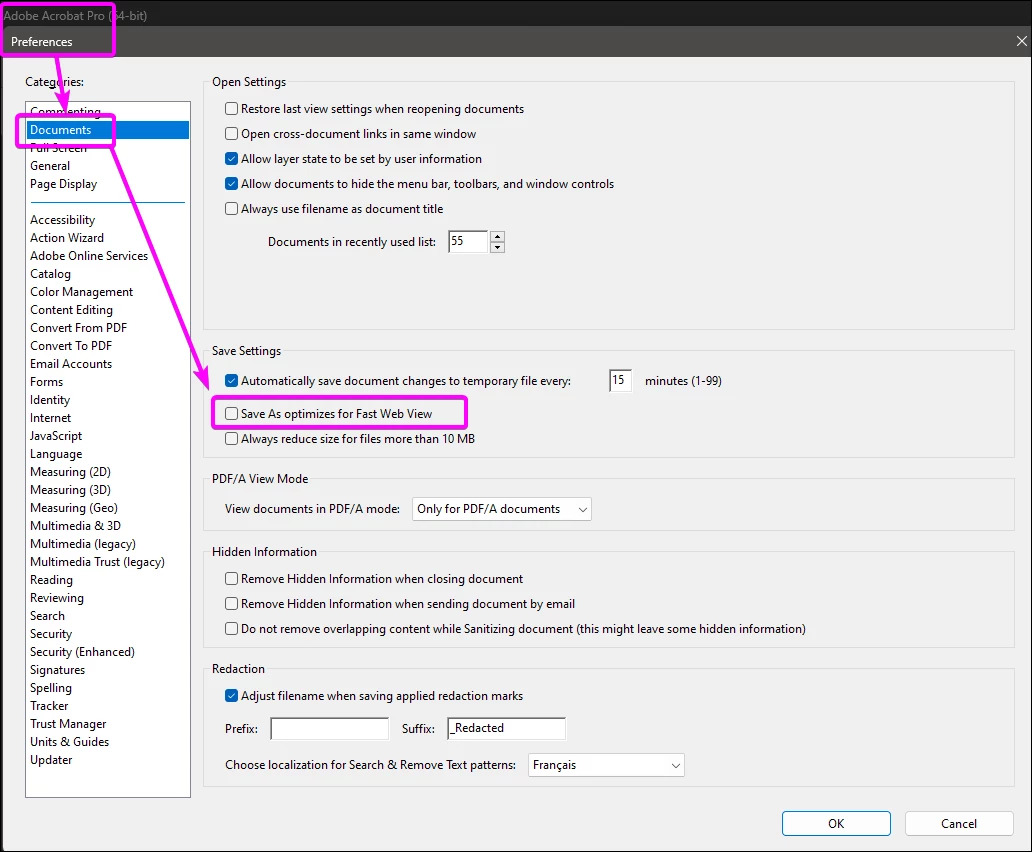
Yes, Acrobat can fix this.

Tick this option in the Preferences and re-save (as) your PDFs.

This can be done using the Action Wizard.


7 replies

Participating Frequently
June 19, 2024

Chrome latest update fixed this issue. Update your browser and test your pdfs to check. Worked on my machine today.

Participant
June 7, 2024

We fixed this issue by unchecking "Optimize for Fast Web View" in the InDesign export dialog. 

The version that was optimized for fast web view had broken links, while the one that was not optimized had working links. 

Participating Frequently
June 7, 2024

Thanks. I'll pass this along for future documents. Still waiting on Chromium to add a fix for the old ones to work. 

one_offAuthor
Participating Frequently
June 10, 2024

Are you sure thus will be fixed in Chromium?

JR Boulay
Community Expert
Community Expert
May 28, 2024

Chrome is a spyware and a web browser, not a PDF reader.

You should not use it.

Acrobate du PDF, InDesigner et Photoshopographe
Participating Frequently
May 28, 2024

I agree and try not too. But a lot of users and potential customers do use it. Most of those people do not have an Acrobat extension or even anything outside of a browser to view pdfs. 

Participant
May 28, 2024

Check your settings in Chrome ... click on Extensions and make sure Adobe Acrobat and Google Docs are toggled on. Quit and reopen your pdf. That worked for me.


Participant
May 28, 2024

It's Chrome not your PDF. I had this issue with colleagues not being able to get the hyperlinks to work but they were all working for me in Firefox and Indesign and Acrobat

maxwithdax
Community Expert
Community Expert
May 23, 2024

Are these links you created with the Hyperlink panel or are these simply text elements that format like links with a www and a .com in them? Acrobat has an AutoDetect Hyperlinks feature. Just trying to understand if it is that feature not working in the browser or is it that it is not recognizing the properly created hyperlink from InDesign. 


As others have stated, ultimately if it is created correctly in the PDF but the Viewer is the culprit, there is not much Adobe can do about that.

Participating Frequently
May 23, 2024

Acrobat works fine. Chromium Windows based default viewers(Chrome + Edge) look to be the problem. Links are added with link tool InDesign. There was a Chrome update recently that suddenly removed all links. I have a ticket with Chromium describing this issue. All of our PDFs were fine on previous version until latest update. We even tested this in house on old/new Chrome updates.

one_offAuthor
Participating Frequently
May 24, 2024

I can confirm that we have the exact same problem. Links are created in InDesign. Can you post a link to your Chromium ticket.

Participating Frequently
May 23, 2024

We have the same issue. Did you create PDFs with InDesign? This appears to only occur in Windows versions of Chrome and Edge. We have submitted a ticket with Chrome. You should do the same. 

Abambo
Community Expert
Community Expert
May 23, 2024

As long as it happens with Chrome and Edge, there is no Adobe product involved, and you need to ask in the Microsoft or Google fora.

ABAMBO | Hard- and Software Engineer | Photographer