
Participating Frequently
August 6, 2024
Answered

List box field in my form will not retain the selection

  • August 6, 2024
  • 1 reply
  • 348 views

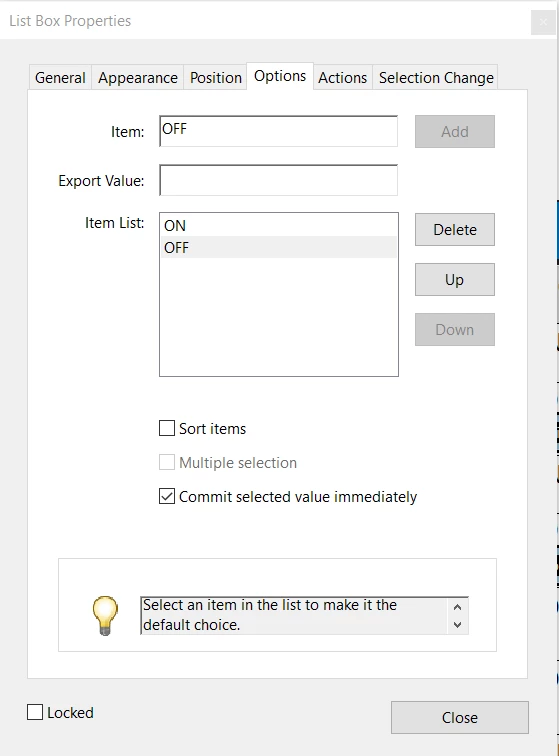
Acrobat Pro 2024. I have created a form with several Listbox fields. The fields have two items in the list, ON and OFF. I have not designated a default value. I have checked "Commit selected value immediately."
I can select ON in the field, but when I click into the next field, the first field reverts back to OFF. It will only retain the ON selection if I click into the initial box again before moving to the next field. 
Is there some way that I can make the field retain the selection without having to click into it a second time?
 

This topic has been closed for replies.
Correct answer ls_rbls

Hi @Delightful_shape157F ,


It is my understanding that Listbox objects  are meant to be used in workflows where multiple selections are allowed.


Asuming also that you've assigned different fieldnames to each listbox on your PDF , and that there are no JavaScripts involved, I'd recommend using dropdown menus.


The dropdown menu should work better  in a workflow where your users are constrained to  selecting only one out of two provided options.

1 reply

ls_rbls
Community Expert
ls_rblsCommunity ExpertCorrect answer
Community Expert
August 7, 2024

Hi @Delightful_shape157F ,


It is my understanding that Listbox objects  are meant to be used in workflows where multiple selections are allowed.


Asuming also that you've assigned different fieldnames to each listbox on your PDF , and that there are no JavaScripts involved, I'd recommend using dropdown menus.


The dropdown menu should work better  in a workflow where your users are constrained to  selecting only one out of two provided options.