
Participant
October 31, 2024
Question

Losing Foreign Characters

  • October 31, 2024
  • 3 replies
  • 1163 views

I have to create a PDF document for our German customers and when I download it from our website it displays it on the browser. However, some of the special characters in the document are not spaced correctly, so I was trying to move them using Adobe Pro. When I open the document in Adobe Pro these characters are missing and just have a square box where the characters once were. How do I prevent this from happening or will I have to go through the whole document adding the missing characters manually?
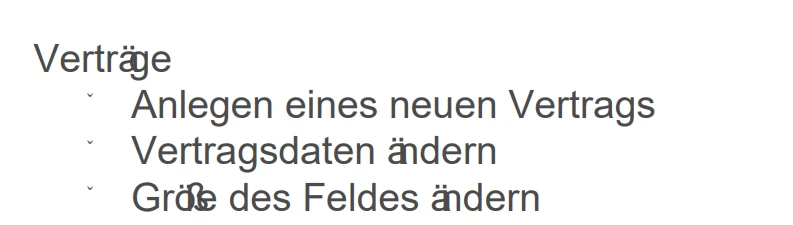
 From the above example, taken from the PDF opened in the browser, you can see the special characters are not spaced correctly.
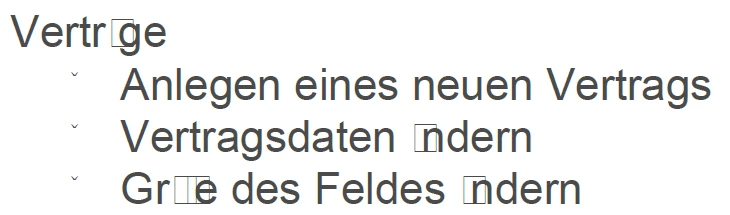
 From the above example, taken from Adobe Pro, you can see the special characters are missing.

This topic has been closed for replies.

3 replies

MikelKlink
Participating Frequently
October 31, 2024

It looks like there are more problems in your document than merely incorrectly spaced characters. Can you share one such document for analysis?


Brad @ Roaring Mouse
Community Expert
Community Expert
October 31, 2024

Several things can be at play here. I suspect that whatever program created the PDF was not configured to properly embed the fonts, so when you open it elsewhere it's relying on availble system fonts.

Even if there was a proper emded, often, language glyphs are embedded separately.

What does it show in the Document Properties > Fonts?

How was the file created?

Can you upload it here?


fabiana.fAuthor
Participant
November 4, 2024

Thank you for your reply. Unfortunately, I cannot upload the file because it contains sensetive information. However, I have managed to veiw the Fonts see attached:


fabiana.fAuthor
Participant
November 4, 2024

The document is stored as a webpage on our webportal for our customers. It is created when export to PDF is selected.

JR Boulay
Community Expert
Community Expert
October 31, 2024

Which software are you using for creating this PDF form?

Acrobate du PDF, InDesigner et Photoshopographe