Participant
July 10, 2019
Question

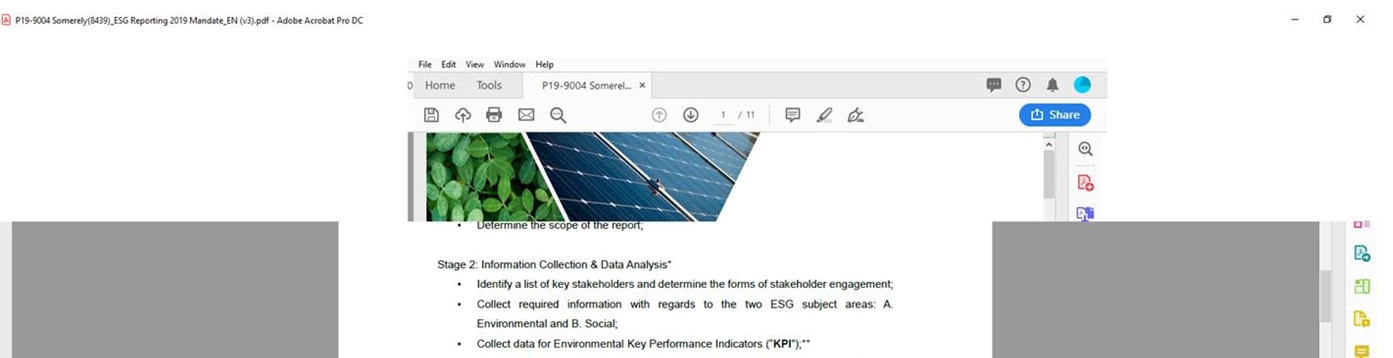
lost menu toolbar suddenly

  • July 10, 2019
  • 3 replies
  • 1390 views

Dear Adobe support,

The existing version always lost toolbar in Windows 10 1803

Adobe Acrobat DC

19.012.20035
This topic has been closed for replies.

3 replies

ls_rbls
Community Expert
Community Expert
August 8, 2019

Hello itd27362125,

This is a very late reply but I got curious with the reocurring issue.

Is your Windows 10 running in tablet mode or Desktop Mode? If that was the case, would switching to Desktop Mode improve in anyway?

What other programs or software are running simultaneously in the background when you use the Acrobat DC product? Can identify if a drastic change in available memory to the OS becomes available if you disable those other programs (for testing purpose) and just run the Adobe product by itself?

And how big is the file you try to work with when you say it still happens sometimes after trying Amals' recommendations?

Is this computer participating in a networked environment.. perhaps trying to share the same file in more than one computer? synchronizing to the cloud service?

Participant
July 18, 2019

Hi Amal,

It still doesn't work. It still happens sometime even reinstall

Inspiring
July 11, 2019

Hi There,

I understand your situation, as you are getting trouble with the toolbar hiding frequently on Adobe Acrobat DC, please try the following troubleshooting steps:

I hope this will fix the issue, do keep us updated with the results.

Regards,

Amal
