Participant
May 28, 2018
Answered

Lost the option to save as a PDF

  • May 28, 2018
  • 1 reply
  • 29568 views

My documents won't save as a PDF, unless I go to options, add-ins, go, and add in Adobe Acrobat each time.  I no longer have the option to save as a PDF unless I do all that.  Any ideas how to fix this issue?

Correct answer Patrick374536086elz

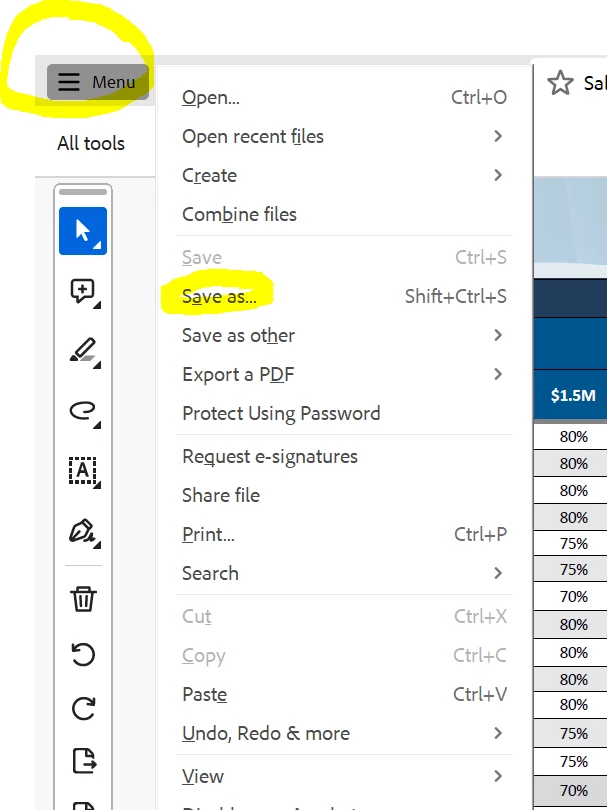
This was driving me crazy. FINALLY Found it. 

It's in the Menu button in top left. 

Seems so obvious now. But that was after I spent the last 2 weeks trying to figure this out. Brutal. 

Hope this helps. 


1 reply

AnandSri
Legend
May 28, 2018

Hello Sherrys,

We apologize for the inconvenience caused, as per the description above, you are not able to save a PDF using "Save-As" function, Is that correct?

Please navigate to Acrobat's Preferences once and uncheck these two options, Go to Edit>Preferences>General>Uncheck:

  1. Show online Storage when opening files.
  2. Show online Storage when saving files.

and check if this brings any difference. Make sure that you have the latest version of Acrobat installed, check for any pending updates of Acrobat from help>check for updates. Reboot the machine after installing any updates.

If you still experience any issue, please share the following piece of information so that we can assist you in a better manner:

Let us know how it goes and share your findings.

Regards,

Anand Sri.

Participant
September 29, 2023

This does not work for me.  I open a template, I want to save it as something else so I can use the empty template again next time.  I do not have that option.  It writes over the template.  Very annoying.