frankieironside478
Participant
June 28, 2021
Question

Mac user - reduce size of comment box on page

  • June 28, 2021
  • 1 reply
  • 945 views

I can not view where the comment is pointing at because the box is so big. Does anyone know how to reduce the size of the boxes, or highlight the section the comment is pointing to?
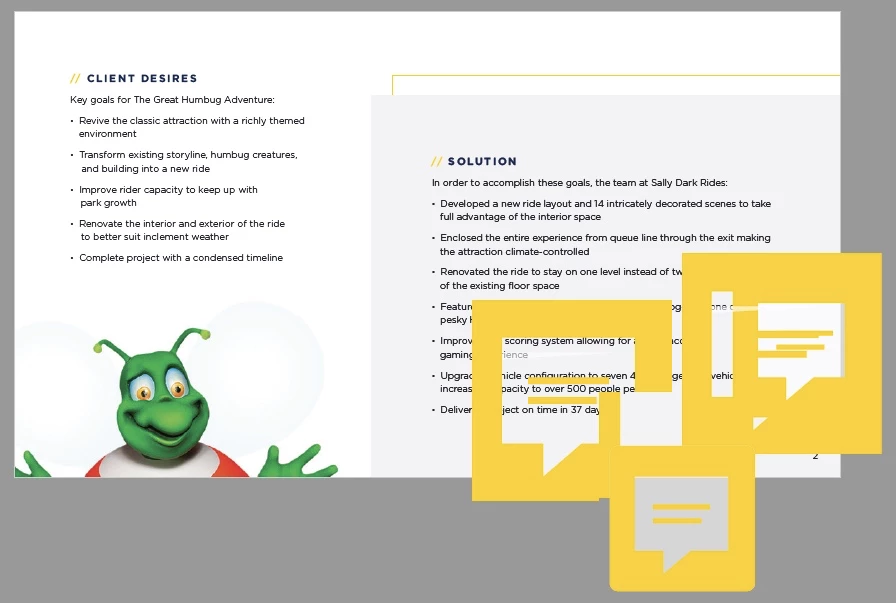

 

This topic has been closed for replies.

1 reply

Meenakshi Negi
Community Manager
Community Manager
June 29, 2021

Hello,


Thank you for reaching out.


There is no option to change the comment icons. However, the icons should not be this big.

Could you please confirm if the comment was added by you?


Thanks,

Meenakshi

frankieironside478
Participant
July 6, 2021

Hi Meenaskshi, 


No, these are comments entered by someone else that I am trying to view.

They do not appear this large on the person's window who made the comment. 

Only Mehak
Adobe Employee
Adobe Employee
July 13, 2021

Hello,


Thanks for your response.Could you help us with the following so that we can debug the issue better at our end:

1. Is it happening for a specific file or for other files as well?

2. Is the file a personal file or a shared file between you and the author of the comment ?

3. Can you share the system resolution and OS on which the issue is seen ?

4. Could you share a sample file with us on which you are observing the issue?


Thanks

Mehak Aggarwal