

Axiom Online
Participant
April 14, 2020
Answered

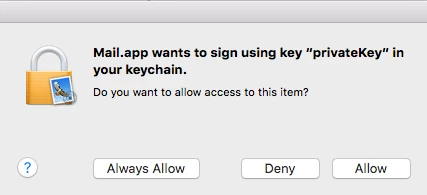
Mail.app wants to sign using key "privatekey" in your keychain

  • April 14, 2020
  • 13 replies
  • 110933 views

I wanted to sign a document using the sign/signature tool but for whatever reason, I ended creating a digital signature by mistake now I can't send the email without attaching a private key. I needed to remove this ASAP. 


Adobe Reader doesn't allow me to remove the certificate. i.e clicking on the "Remove Id" does nothing.


SOLUTION:


1. Open Keychain on your mac "search 'keychain' in Spotlight (The magnifying glass icon on the top right of your screen) or Go to >Applications>Utilities>Keychain.app

2. Find the culprit certificate in the list

3. Take a back of the key in case something goes wrong by exporting the certificate.

4. >>> Delete

5. Restart the Mail app and also the Adobe Reader app.


Sorted 🙂  

Correct answer Jelle5C10

Hi,

When you open a new email, you can simply deactivate this digital encrypted signing by clicking on the little blue encircled checkmark in the new mail editor window. If you do this, it will stay unchecked for all subsequent emails. So no need to manually delete digital certificates from the keychain.

(I'm on Big Sur 11.1).

13 replies

Jelle5C10Correct answer
Participant
July 26, 2021

Hi,

When you open a new email, you can simply deactivate this digital encrypted signing by clicking on the little blue encircled checkmark in the new mail editor window. If you do this, it will stay unchecked for all subsequent emails. So no need to manually delete digital certificates from the keychain.

(I'm on Big Sur 11.1).

Participant
November 11, 2021

Thank you Jelle5C10, simple and elegant.  I somehow created a monster without intending to, and all attempts to send some urgent documents failed until I found your solution.  Phew! (I am on Monterey 12.0.1).  Please accept a large virtual bouquet of flowers 💐

Participant
March 31, 2021

This worked a treat!  Thank you 😄

Participant
September 30, 2020

So which key chain is the culprit?  

I've deleted a bunch of them and none of them have the effect.

I really must remove the request to type in my password for each email --it's absurd!

Participant
February 3, 2021

Go to "my certificates' and delete them all and then send mail you should be allowed.

Participant
March 4, 2021

Huma5DD1's solution (delete items in "MyCertificates" - found under the Category menu in the bottom L of the Keychains window) worked for me.

Thank you so much!