
Inspiring
May 2, 2021
Answered

Making an add 'empty column' button [JAVASCRIPT]

  • May 2, 2021
  • 2 replies
  • 3952 views

Hello,

I'm trying to make multiple buttons that when hit will pull the fields above It down until it hits the field where the button lies:
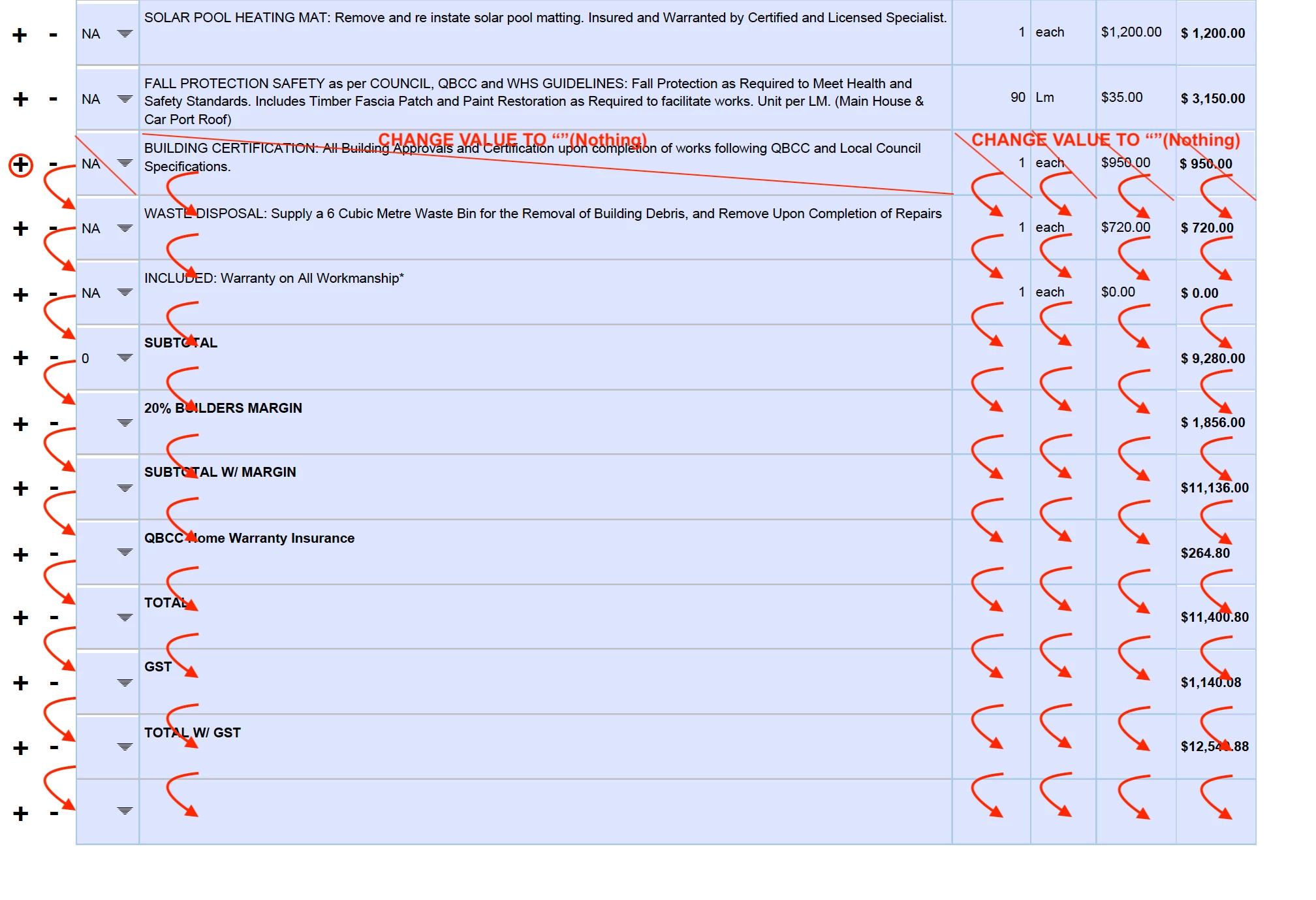
 Once all the fields move down then the value of the fields that are next to the button pressed will be changed to "".


I have tried to use the following code but it does not seem to work:


  var idNumber = parseInt(event.target.name.replace("Add", ""));
for (var i = 40; i >= idNumber; i--) {
    this.getField("ID" + i).value = this.getField("ID" + (i - 1)).value;
    this.getField("Desc" + i).value = this.getField("Desc" + (i - 1)).value;
    this.getField("No" + i).value = this.getField("No" + (i - 1)).value;
    this.getField("Unit" + i).value = this.getField("Unit" + (i - 1)).value;
    this.getField("Price" + i).value = this.getField("Price" + (i - 1)).value;
    this.getField("Total" + i).value = this.getField("Total" + (i - 1)).value;
}
    this.getField("ID" + idNumber).value = "";
    this.getField("Desc" + idNumber).value = "";
    this.getField("No" + idNumber).value = "";
    this.getField("Unit" + idNumber).value = "";
    this.getField("Price" + idNumber).value = "";
    this.getField("Total" + idNumber).value ="";


This code just replicates the first field that has a value to the fields under it one time.


Can someone please help me with this problem?

Thank you.

This topic has been closed for replies.
Correct answer Flynn0101

Sorry, @Bernd Alheit  I do not understand? how does the script vary? (besides the row number "idNumber").


I have successfully made this code which does what I have described. I was advised not to use "=>" but it seems to be the only way the script works );

var idNumber = parseInt(event.target.name.replace("Add", ""));
for( i = 40; i => idNumber; i-- ){
    this.getField("ID" + i).value = this.getField("ID" + (i - 1)).value;
    this.getField("Desc" + i).value = this.getField("Desc" + (i - 1)).value;
    this.getField("No" + i).value = this.getField("No" + (i - 1)).value;
    this.getField("Unit" + i).value = this.getField("Unit" + (i - 1)).value;
    this.getField("Price" + i).value = this.getField("Price" + (i - 1)).value;
    this.getField("Total" + i).value = this.getField("Total" + (i - 1)).value;
if (i === idNumber+1) { break; }
}
    this.getField("ID" + idNumber).value = "";
    this.getField("Desc" + idNumber).value = "";
    this.getField("No" + idNumber).value = "";
    this.getField("Unit" + idNumber).value = "";
    this.getField("Price" + idNumber).value = "";
    this.getField("Total" + idNumber).value = "";

2 replies

Bernd Alheit
Community Expert
Community Expert
May 3, 2021

Can you share the form?

Flynn0101Author
Inspiring
May 3, 2021
Bernd Alheit
Community Expert
Community Expert
May 3, 2021

Use following to clear the row:

    var i = idNumber;
    this.getField("ID" + i).value = "";
    this.getField("Desc" + i).value = "";
    this.getField("No" + i).value = "";
    this.getField("Unit" + i).value = "";
    this.getField("Price" + i).value = "";
    this.getField("Total" + i).value = "";
Bernd Alheit
Community Expert
Community Expert
May 2, 2021

Empty column or empty row?

Flynn0101Author
Inspiring
May 2, 2021

Row* sorry

@Bernd Alheit