
Participant
October 19, 2022
Answered

Making two dependent list box value 100%

  • October 19, 2022
  • 1 reply
  • 508 views

Hi,

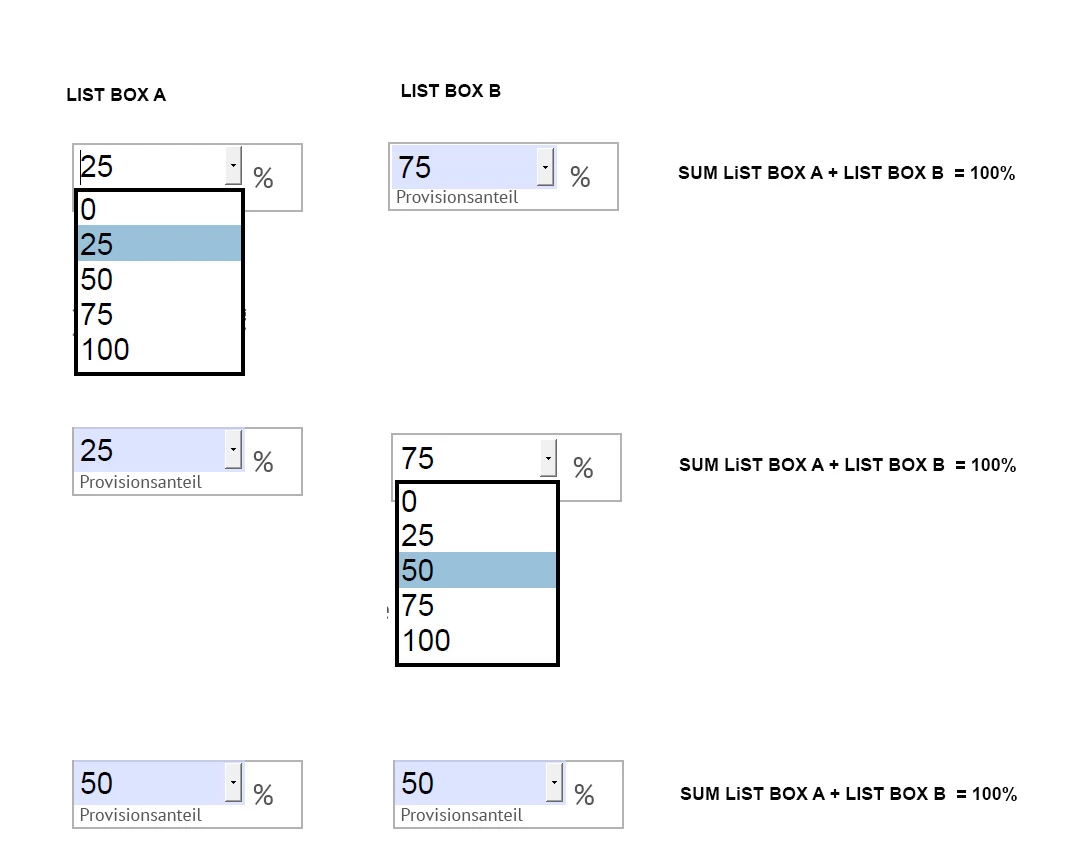
I have two list box elements. The values of each list box are:

0, 25. 50, 75, 100

GOAL: The value together should always be 100.


1) If I choose 25 on LIST BOX A then LIST BOX B automatically should be 75.

2) If I change the value of LIST BOX B to 50 then LIST BOX A should have 50 (GOAL)


For 1) I found this solution which I put as custom script within the list box setting calculation tab.

This works.

But If I  change LIST BOX B (2) there is no change of the value in LIST BOX A.


CODE for LIST BOX A

var newIndex2 = 0;
var field1 = this.getField("Dropdown1");
var field2 = this.getField("Dropdown2");
var selectedIndex2 = field1.currentValueIndices;
var newIndex2 = (4-selectedIndex2);
field2.currentValueIndices = newIndex2;


CODE for LIST BOX B

var newIndex1 = 0;
var fieldA = this.getField("Dropdown1");
var fieldB = this.getField("Dropdown2");
var selectedIndex1 = fieldB.currentValueIndices;
var newIndex1 = (4-selectedIndex1);
fieldA.currentValueIndices = newIndex1;

Any help? See attached file
 

This topic has been closed for replies.
Correct answer Karl Heinz Kremer

I would do this via custom validation scripts. For Dropdown1, use this script:

var setValue = 100 - Number(event.value);
this.getField("Dropdown2").value = setValue;

 And for Dropdown2, use this script:

var setValue = 100 - Number(event.value);
this.getField("Dropdown1").value = setValue;

As you can see, the only difference is in the fieldname that we are trying to change.  

1 reply

Karl Heinz  Kremer
Community Expert
Karl Heinz KremerCommunity ExpertCorrect answer
Community Expert
October 19, 2022

I would do this via custom validation scripts. For Dropdown1, use this script:

var setValue = 100 - Number(event.value);
this.getField("Dropdown2").value = setValue;

 And for Dropdown2, use this script:

var setValue = 100 - Number(event.value);
this.getField("Dropdown1").value = setValue;

As you can see, the only difference is in the fieldname that we are trying to change.  

Participant
October 20, 2022

Hi Karl-Heinz,

thanks a lot. This worked very well.