Participant
July 27, 2023
Resuelto

Me ha desaparecido la opción "realizar una instantánea" ¿Se puede recuperar?

  • July 27, 2023
  • 2 respuestas
  • 17453 visualizaciones

En la última actualización de Adobe Acrobat Reader no puedo encontrar esta función y la necesito.

Este tema ha sido cerrado para respuestas.
Mejor respuesta de AkanchhaS8194121

Hi @claudia31343877b811 


We believe you are on Acrobat's Modern Viewer. 

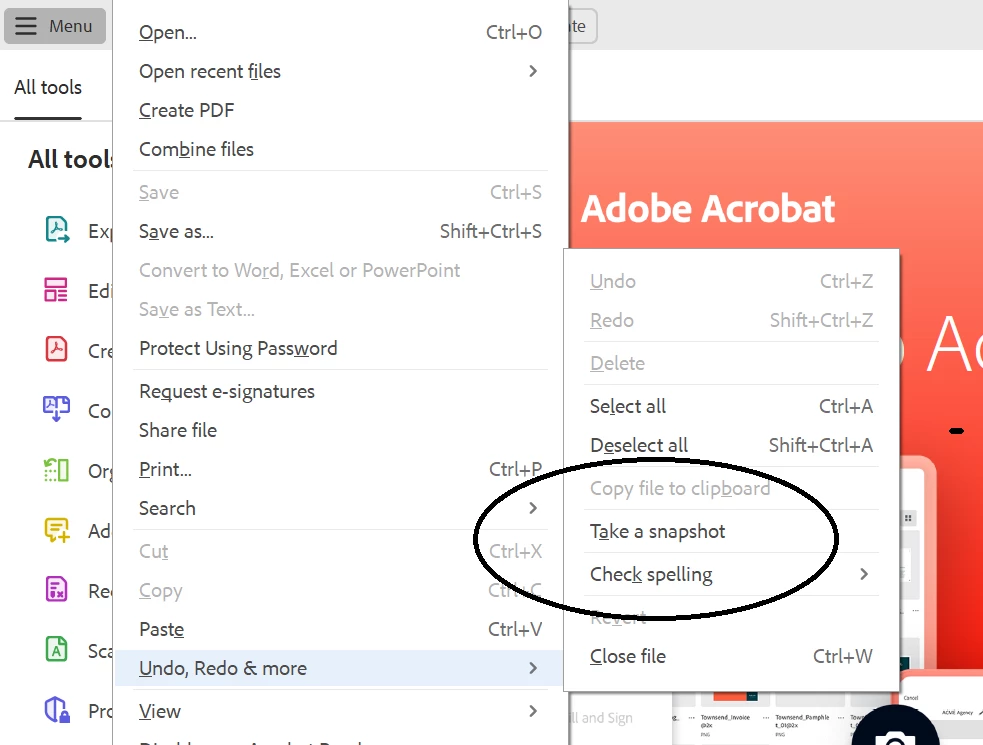
In New UI, to get the Take a Scanshot option click on Hamburger icon> Undo, Redo and More>Take a snapshot
 

https://helpx.adobe.com/acrobat/using/new-acrobat-experience.html 


Thanks,

Akanchha 

2 respuestas

AkanchhaS8194121
Legend
July 27, 2023

Hi @claudia31343877b811 


We believe you are on Acrobat's Modern Viewer. 

In New UI, to get the Take a Scanshot option click on Hamburger icon> Undo, Redo and More>Take a snapshot


https://helpx.adobe.com/acrobat/using/new-acrobat-experience.html 


Thanks,

Akanchha 

Participant
September 5, 2023

Hello @AkanchhaS8194121,


Thank you. I am using the Modern Viewer and your solution worked well.

Is there any way of adding a shortcut for this? This is one of my most used features and it used to be easier to find. Thank you again.

Participant
October 9, 2024

I have the same question.

try67
Community Expert
Community Expert
July 27, 2023

Disable the new UI (via Options - Disable New Acrobat Reader) and then you'll find it once more under the View menu.