Exit
  • Global community
    • Language:
      • Deutsch
      • English
      • Español
      • Français
      • Português
  • 日本語コミュニティ
  • 한국 커뮤니티
0

Metadata PDF

Community Beginner ,
Oct 18, 2021 Oct 18, 2021

Hello
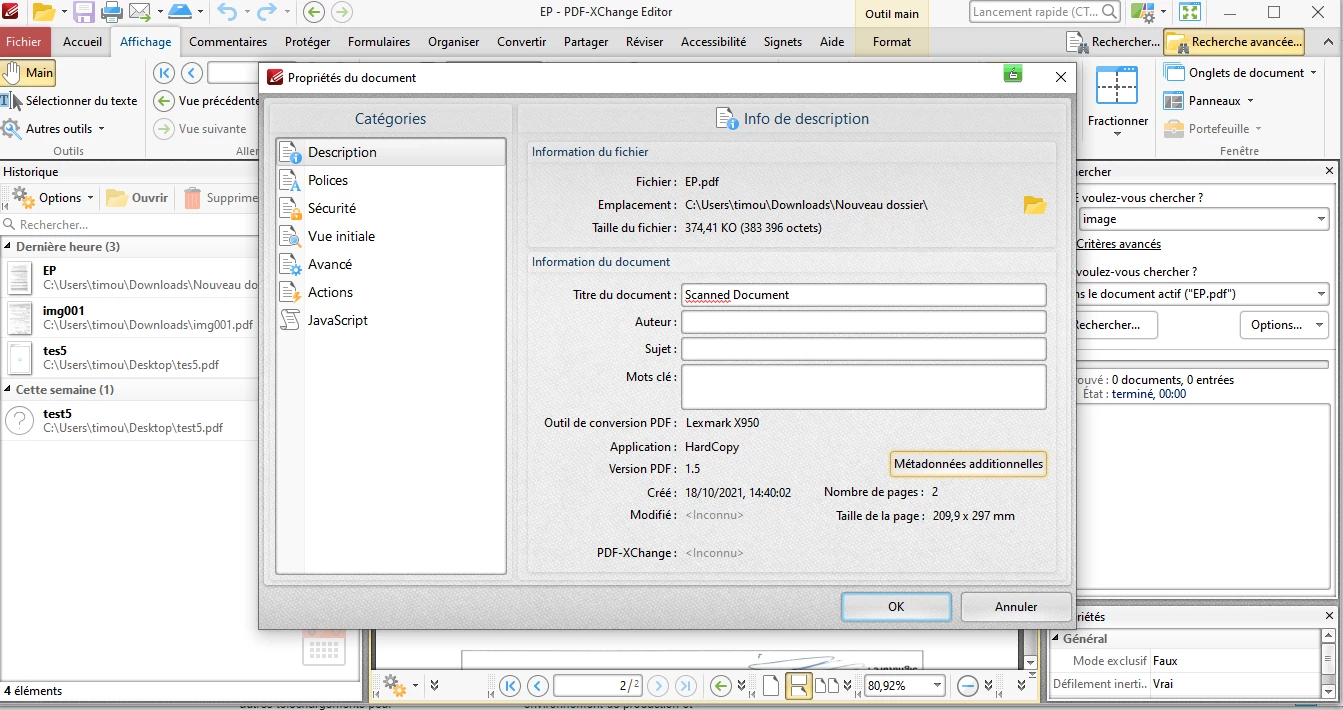
In Capture 1 and 2 what is the application in PDF file metadata: HARD COPY


Regards.
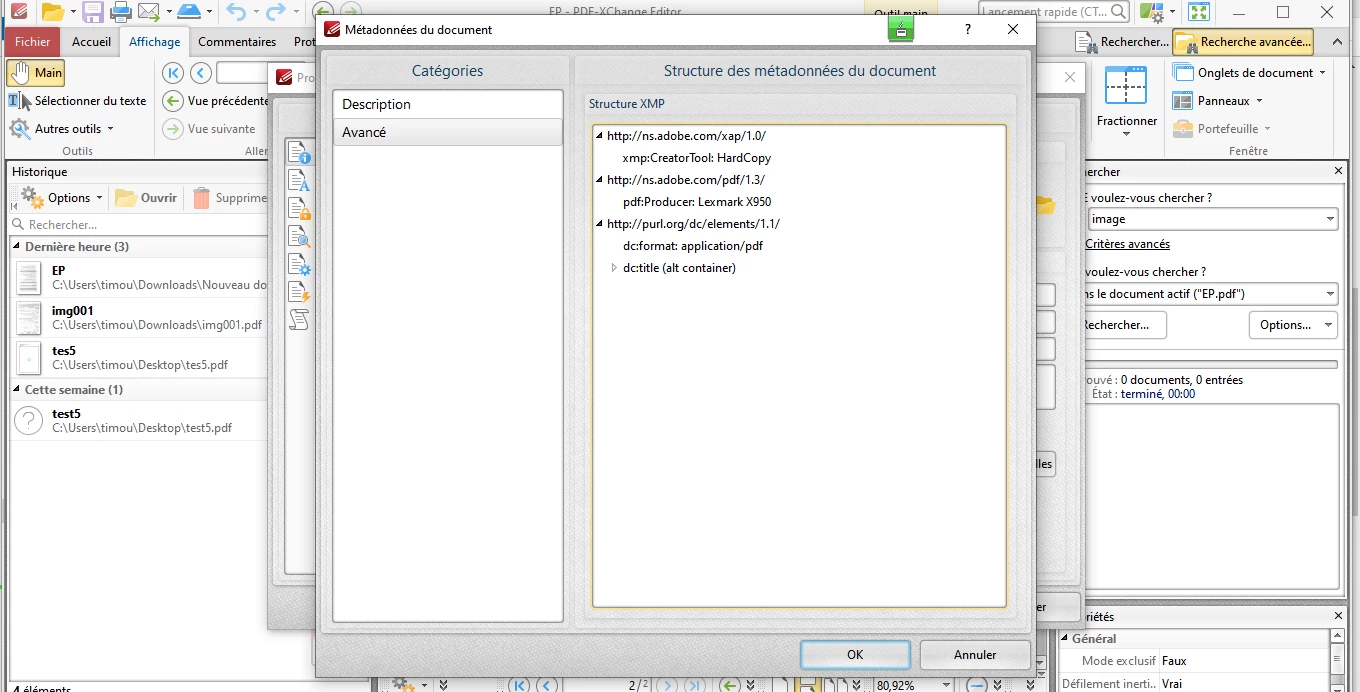
 

Capture1.PNGCapture2.PNG

TOPICS
Create PDFs , Edit and convert PDFs , PDF forms , Security digital signatures and esignatures
1.9K
Translate
Report
Community guidelines
Be kind and respectful, give credit to the original source of content, and search for duplicates before posting. Learn more
community guidelines
Community Expert ,
Oct 18, 2021 Oct 18, 2021

What is the issue with this?

The scanner software have used this entry.

Translate
Report
Community guidelines
Be kind and respectful, give credit to the original source of content, and search for duplicates before posting. Learn more
community guidelines
Community Beginner ,
Oct 18, 2021 Oct 18, 2021

The issue is that I want to know if this document was modified and the signature aded by someone using this app.

Is this file has only been scanned with a Lexmark printer or has it been modified before being printed in PDF?

Translate
Report
Community guidelines
Be kind and respectful, give credit to the original source of content, and search for duplicates before posting. Learn more
community guidelines
Community Expert ,
Oct 18, 2021 Oct 18, 2021

It can be the original version or a modified version.

Translate
Report
Community guidelines
Be kind and respectful, give credit to the original source of content, and search for duplicates before posting. Learn more
community guidelines
People's Champ ,
Oct 18, 2021 Oct 18, 2021

@sametsam885C3A 

Note that your screen captures are not from Adobe Acrobat or another Adobe software product, so it's not possible to definitively identify how your PDF program uses the metadata.


Application means where the original content was created.


In the second screen capture (on the right), Application = HardCopy indicates that the PDF does not have a digital source application, such as MS Word. The PDF was scanned from a hard copy with a Lexmark x950, which I assume is a multi-function printer/scanner device.


Application is ususally paired with the PDF Producer, which is the software utility that actually converted the source data into a PDF.


If, on the other hand, the PDF had been produced from a digital source file, you would see something like any of these samples from various programs and PDF converters from several different companies:
 

  • Application: Adobe InDesign 16.4 (Macintosh)
    PDF Producer: Adobe PDF Library 16.0
     
  • Application: Acrobat PDF Maker 20 for Microsoft Outlook
    PDF Producer:  Adobe PDF Library 20.13.62
     
  • Application: Microsoft Word 2016
    PDF Producer: AxesPDF for Word
     
  • Application: Framemaker 8
    PDF Producer: Acrobat Distiller 8.2.6 (Windows)
     
  • Application: Acrobat PDF Maker 18 for Word
    PDF Producer: Adobe PDF Library 15.0


Creation Date (Créé in your version) = the date the PDF file was created, which in your situation would be the date it was scanned with the Lexmark.


Cannot tell when the document was signed: either before it was scanned or added after it was scanned.


Modified Date (Modifié) would show if the PDF had been changed since it was originally scanned, and in your sample it is blank.


|    Bevi Chagnon   |  Designer, Trainer, & Technologist for Accessible Documents |
|    PubCom |    Classes & Books for Accessible InDesign, PDFs & MS Office |
Translate
Report
Community guidelines
Be kind and respectful, give credit to the original source of content, and search for duplicates before posting. Learn more
community guidelines
Community Beginner ,
Oct 18, 2021 Oct 18, 2021
but normally the scanned document is a paper document
therefore the scanned document is not a paper document which is scanned directly on a Lexmark X950 printer but it is a document already scanned
Translate
Report
Community guidelines
Be kind and respectful, give credit to the original source of content, and search for duplicates before posting. Learn more
community guidelines
People's Champ ,
Oct 18, 2021 Oct 18, 2021
quote
but normally the scanned document is a paper document
therefore the scanned document is not a paper document which is scanned directly on a Lexmark X950 printer but it is a document already scanned
By @sametsam885C3A


Your PDF file is a picture of the printed document. That's what scanning is.


Whether your PDF was signed before the document was scanned or after it was scanned is not something we can tell from the metadata.


I'm suspecting that it was signed before it was scanned because the Modified/Modifié information is blank. But that is really a guess. There's no way to tell for sure.


|    Bevi Chagnon   |  Designer, Trainer, & Technologist for Accessible Documents |
|    PubCom |    Classes & Books for Accessible InDesign, PDFs & MS Office |
Translate
Report
Community guidelines
Be kind and respectful, give credit to the original source of content, and search for duplicates before posting. Learn more
community guidelines
Community Beginner ,
Oct 18, 2021 Oct 18, 2021

according to you if I take a paper document and I scan it on a Lexmark x950 multifunction printer, do I find in the application metadata the name HardCopy.


metadata AdobeAcrobat Reader.PNG

Translate
Report
Community guidelines
Be kind and respectful, give credit to the original source of content, and search for duplicates before posting. Learn more
community guidelines
People's Champ ,
Oct 18, 2021 Oct 18, 2021

Yes, that's correct.

Because the original source wasn't a digital file, but instead is a hardcopy (or printed-on-paper) version.

"Hardcopy" means a printed document (or copie papier in my poor French translation).


|    Bevi Chagnon   |  Designer, Trainer, & Technologist for Accessible Documents |
|    PubCom |    Classes & Books for Accessible InDesign, PDFs & MS Office |
Translate
Report
Community guidelines
Be kind and respectful, give credit to the original source of content, and search for duplicates before posting. Learn more
community guidelines
People's Champ ,
Oct 18, 2021 Oct 18, 2021
LATEST

@sametsam885C3A 

In your case, the word "Application" is not the best choice of words. It's what Adobe Acrobat usually identifies as the application or software program that created the source digital file.


In your case, it would be better if it said "source of the original content," and the answer would be "Hardcopy," or the original printed paper that was scanned on the Lexmark.


I hope that helps to clarify what this means.

  1. A printed document was scanned on the Lexmark and converted to a PDF with a picture of the scan.
  2. Maybe the document was signed before it was scanned, maybe not. We can't tell.
  3. The PDF of the scanned document wasn't changed/modified after the PDF was created.


|    Bevi Chagnon   |  Designer, Trainer, & Technologist for Accessible Documents |
|    PubCom |    Classes & Books for Accessible InDesign, PDFs & MS Office |
Translate
Report
Community guidelines
Be kind and respectful, give credit to the original source of content, and search for duplicates before posting. Learn more
community guidelines