


Copiar link para a área de transferência
Copiado
Hi.
Running Win7 with IE8 and Acrobat 9 Standard. For some reason after I installed Acrobat 9, IE8 does not load the Adobe tool bar.
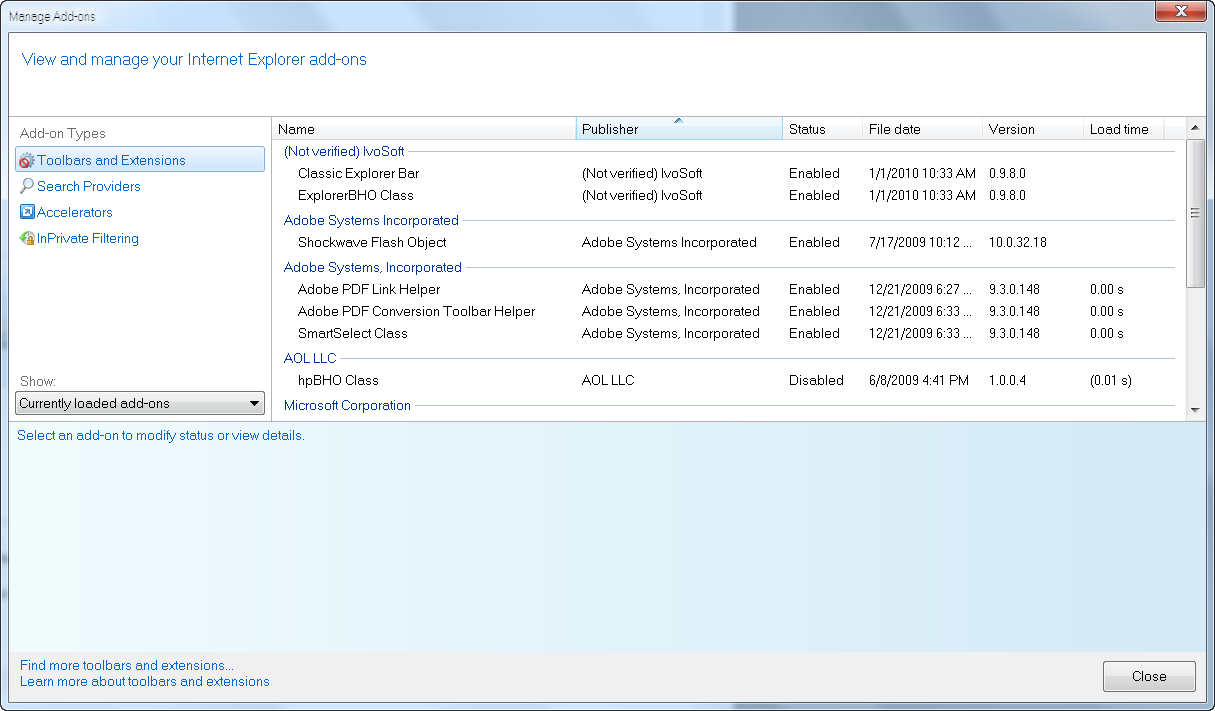
In IE8 Under Tools > Manage Add-ons (Currently loaded add-ons) I can see the following:
1. Adobe PDF Link Helper
2. Adobe PDF Conversion Toolbar Helper
3. SmartSelect Class
What I do not see listed is just simply "Adobe PDF"
Anyone know how to get it back?
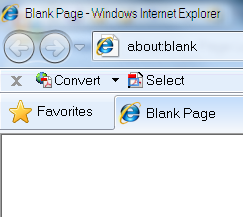
This is what it should look like (snap shot taken from another machine).




Copiar link para a área de transferência
Copiado
I just found that the problem is the 64 bit version of IE 8. When I switch to the 32 bit version, which is an option under "all programs," the missing toolbars are there. Sheesh. You'd think either Microsoft or Adobe would have figured this out. There are a number of forums/blogs/support conversations where this problem is discussed and no solution offered. They don't even identify the problem.
 36
respostas
36
36
respostas
36


Copiar link para a área de transferência
Copiado
Activate 'Adobe PDF Conversion Toolbar Helper' or look at the other machine.
Copiar link para a área de transferência
Copiado

Copiar link para a área de transferência
Copiado
I went to VIEW>Toolbars and disabled the Adobe PDF toolbar. I then reenabled it and it came back. This is apparently and issue with an IE8 update.
Copiar link para a área de transferência
Copiado
I'd do that, if I could.
Unfortunately there isn't any PDF toolbar menu item, at all.
Copiar link para a área de transferência
Copiado
Use F8 or F9 to get the toolbar back. One is for the toolbar and the other for the menus. You may have accidentally turned the toolbars off, or that happened with a PDF that was set to turn them off.
Copiar link para a área de transferência
Copiado
Bill,
F8 and F9 don't have any functionality at all with IE8 that I'm aware of.
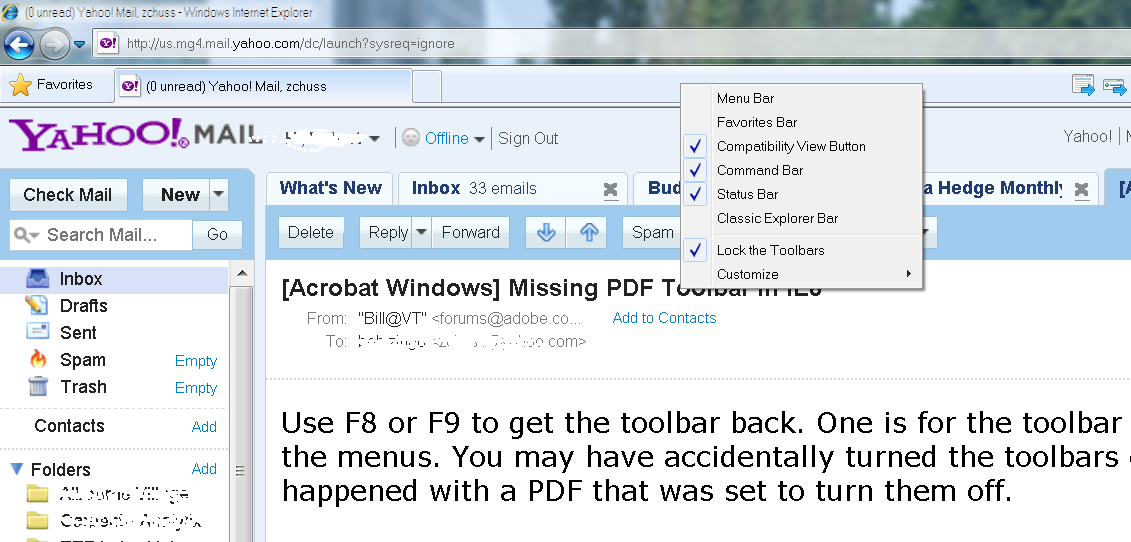
Here's the screen cap below. Note there is no "Adobe PDF" menu item at all.
Copiar link para a área de transferência
Copiado
Opps, sorry. I was thinking AA at the time and not IE. The PDF bar should be listed under the view>toolbars. I had inconsistent results with this button, but it did give me the desired toolbar item.
Copiar link para a área de transferência
Copiado
Nope, not there either...

Copiar link para a área de transferência
Copiado
Try checking TOOLS>Manage Add-ons and see if the Adobe items are enabled. I have 4 Adobe related items enabled with AA7 in IE8. It sounds like you have Acrobat disabled. Sorry to be slow to get back to IE8, but it is not my preferred browser.
Copiar link para a área de transferência
Copiado
Hi.
Running Win7 with IE8 and Acrobat 9 Standard. For some reason after I installed Acrobat 9, IE8 does not load the Adobe tool bar.
In IE8 Under Tools > Manage Add-ons (Currently loaded add-ons) I can see the following:
1. Adobe PDF Link Helper
2. Adobe PDF Conversion Toolbar Helper
3. SmartSelect Class
What I do not see listed is just simply "Adobe PDF"
Anyone know how to get it back?
Copiar link para a área de transferência
Copiado
What version of AA9?
Copiar link para a área de transferência
Copiado
Hi.
Running Win7 with IE8 and Acrobat 9 Standard. For some reason after I installed Acrobat 9, IE8 does not load the Adobe tool bar.
Copiar link para a área de transferência
Copiado
AA9 is at AA9.3 as I recall. Are you running AA9.0? If so, then install all of the updates in order and try again.
Copiar link para a área de transferência
Copiado
AA9.3
Copiar link para a área de transferência
Copiado
Drat, I thought maybe an update would help, but you are already there. I am running out of ideas, but would suggest a repair on Acrobat (done from the control panel>add & remove programs (in XP, a bit different in VISTA).
Copiar link para a área de transferência
Copiado
Unfortunately there is no repair option under control panel>add & remove programs.
Copiar link para a área de transferência
Copiado
In VISTA it is at Control Panel>Programs and Features. I selected Acrobat and it started the process, coming to a point of allowing me to modify, repair, or uninstall. Of course I cancelled, but that is the location. As I indicated the location was different in VISTA where there is no Add & Remove Programs.
Copiar link para a área de transferência
Copiado
Bob thanks, but unless I know this is the expected behavior in Win7 with AA Std 9.0, I'd be reluctant to try it. What if it doesn't offer me the repair option, and instead fully un-installs the application. Then I'd have a lot more work.
Copiar link para a área de transferência
Copiado
You can use the repair option in the help menu of Acrobat.

Copiar link para a área de transferência
Copiado
Having a similar problem with IE8. Have Acrobat Pro 9 too. I enabled in IE8 pdf but no toolbar shows up anywhere. Have Windows 7 too. Also, in older IE version, when I right click the mouse, convert to pdf and append to pdf were there. With IE8, nothing. I know I can convert using Acrobat Pro 9, but prefer the convenience on IE8. Have you solved the problem yet?
Message was edited by: SLBseeker
Copiar link para a área de transferência
Copiado
Nope... it remains an unsolved mystery.
If I recall correctly, most of the methods that were suggested for "fixing" the
problem were fairly involved, including re-installing windows. So I just left
it alone.
Copiar link para a área de transferência
Copiado
Having a similar problem with IE8. Have Acrobat Pro 9 too. I enabled in IE8
pdf but no toolbar shows up anywhere. Have Windows 7 too. Also, in older IE version, when I right click the mouse, convert to pdf and append to pdf were there. With IE8, nothing. I know I can convert using Acrobat Pro 9, but prefer the convenience on IE8. Have you solved the problem yet?

Copiar link para a área de transferência
Copiado
I've got the same issue with one user.
Tried to reset IE 8 to default settings as per: http://windows.microsoft.com/en-GB/windows-vista/Reset-Internet-Explorer-8-settings
No luck with that.
I also did all updates for Adobe 9 Pro, and this didn't help either.
What I noticed is that it works fine when you login under different user account. I understand that this isn't the best solution, but you might want to re create your account and see if it'll work.
Regards,
Sasha
http://www.semargl.ca

Copiar link para a área de transferência
Copiado
I've just had the same problem with Adobe X.
After a little digging on forums and finding no real answer I had a lateral think and found the problem.
You need to fix this in the Adobe reader sofwtare NOT in IE8.
Open up Adobe reader.
Go to Edit - Preferences
Click on Internet
Remove the Tick from the Display in read Mode by Default box
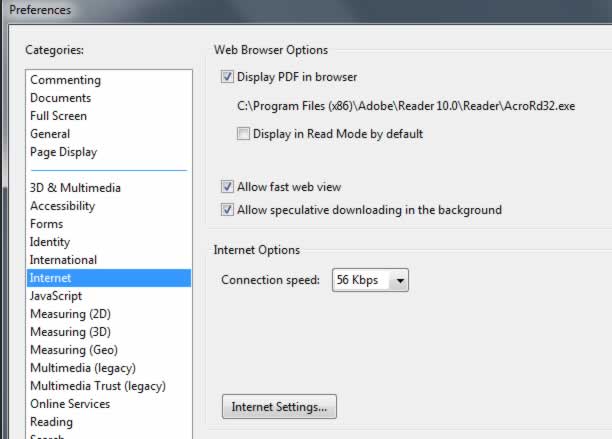
You should now find that the toolbar is back when you open a PDF in IE8.
Hope this works for you - it did for me.
Rgds
taffybach

-
- 1
- 2

Prepare-se! Uma experiência aprimorada da Adobe Community chegará em janeiro.
Saiba mais
 AdChoices

