
Participating Frequently
March 8, 2018
Answered

My Stamps stopped printing

  • March 8, 2018
  • 1 reply
  • 8002 views

I frequently use stamps on my documents, especially my own signature and the included "Sign Here". Today the stamps would not print on my documents. I can see them on the document on-screen, but they do not appear in the print preview or on the printed page. I have repaired Adobe Acrobat, rebooted, and nothing corrects this situation. I am using Windows 10 and they just downloaded an update although I am not sure this is significant as I cant remember which occurred first today.

Can anyone help me get this fixed?

Roxanne
Correct answer Karl Heinz Kremer

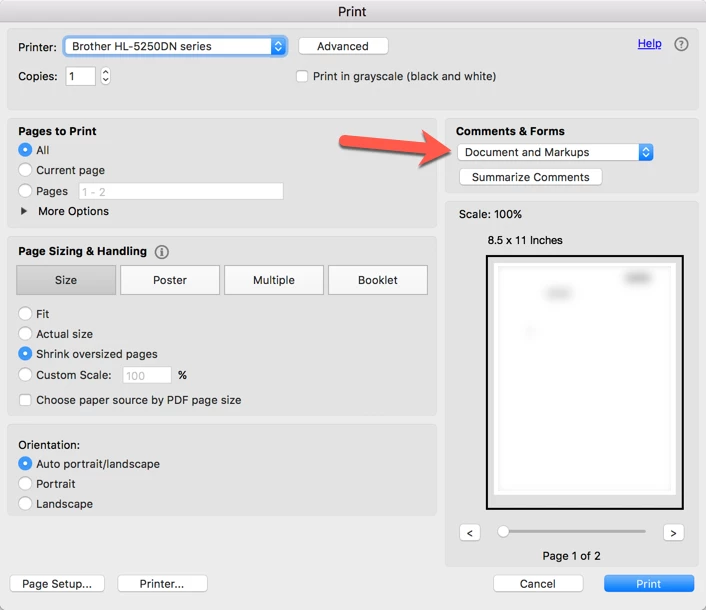
On the print dialog, make sure that "Document and Markups" is selected on the print dialog:

1 reply

Karl Heinz  Kremer
Community Expert
Karl Heinz KremerCommunity ExpertCorrect answer
Community Expert
March 8, 2018

On the print dialog, make sure that "Document and Markups" is selected on the print dialog:

Participating Frequently
March 8, 2018

Thank you. I had also a choice of Document and Stamps. Not sure how it ever became deselected, and sure appreciate your directing me there.

Karl Heinz  Kremer
Community Expert
Community Expert
March 8, 2018

The Markup option will also print stamps, sticky notes and other annotations, Stamps will only print stamps.