Question
Name is lost when open a PDF on Acrobat with Chrome Extension
When I open some PDFs, the name is lost.
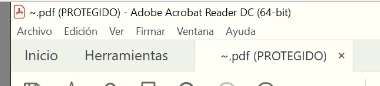

Is there a way to open it with the name? It's important to me to keep the name.

When I open some PDFs, the name is lost.
Is there a way to open it with the name? It's important to me to keep the name.
Already have an account? Login
Enter your E-mail address. We'll send you an e-mail with instructions to reset your password.
 AdChoices