
ks1014
Participant
March 18, 2025
Question

New Outlook opening pdf attachment generates application error

  • March 18, 2025
  • 15 replies
  • 13486 views

When using the "new" Outlook (1.2025.312.200 (Production) - Client Version: 20250307002.16)
to open a pdf (preview works fine) with Adobe Acrobat DC (64-bit 25.001.20432), it generates this error, that when OK is clicked, proceeds to open the pdf for subsequent use without further issues.
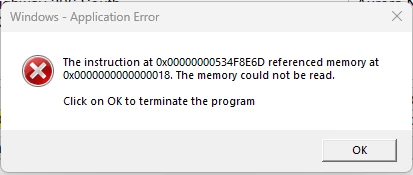
Attempted fixes: Repaired Adobe Acrobat. Changed this setting - Preferences-> Security (Enhanced)-> unchecked the checkbox "Run in AppContainer". No luck.


The same email with pdf attachment works without issue when using Outlook Classic. All other pdfs stored in folders locally, in the cloud, or on network drives open without issue. Seems purely an issue with the new Outlook and Adobe Acrobat. 


Any other suggested things to try, or any news on a fix coming in an update to either Acrobat or Outlook?


15 replies

Participant
April 17, 2025

Hi,


Any solution for this problem? our adobe pro with windows 11 also having this problem. But it works fine in windows 10.

Please update here. I also trying to contact adobe through email, but not able to find adobe support email.

Participant
April 15, 2025

I worked with an agent from Adobe and they had me put in some REG keys that fixed the issue for me. I turned it into a GPO push so here's the commands I used for PowerShell


REG ADD "HKEY_LOCAL_MACHINE\SOFTWARE\Policies\Adobe\Adobe Acrobat\DC\FeatureLockDown" /v "bPromoteRSBezelFeatureLockdown" /t REG_DWORD /d "1" /f

REG ADD "HKEY_LOCAL_MACHINE\SOFTWARE\Policies\Adobe\Adobe Acrobat\DC\FeatureLockDown" /v "bEnableNextActionPaneFeature" /t REG_DWORD /d "0" /f

REG ADD "HKEY_LOCAL_MACHINE\SOFTWARE\Policies\Adobe\Adobe Acrobat\DC\FeatureLockDown" /v "bLiveDocsExperiment" /t REG_DWORD /d "0" /f

Participant
May 6, 2025

this worked for a couple of weeks. But then stopped working....

S_S
Community Manager
Community Manager
May 6, 2025

Hi @stephenc5762173,


Hope you are doing well. Sorry for the trouble with Acrobat.


The team is aware of the issue, and working on a fix.

We request your kind understanding and patience while the fix is released.


Regards,
Souvik.

Participant
April 8, 2025

Having the same issue

Participant
March 25, 2025

One of my users is having the excat same issue. I have uploaded logs.

LOG ID: c5cce373-0fb4-4a3e-9329-b66e8c6eaaff

S_S
Community Manager
Community Manager
March 19, 2025

Hi @ks1014,


Hope you are doing well. Sorry for the trouble.


Our team is aware of the issue, and working on a fix.


That being said, it would be really helpful if you could help us gather logs from your machine: https://adobe.ly/4l1gBRA. Please make sure Procmon is selected. You can upload logs using this tool and share your Unique log ID with us. 


Look forward to hearing from you.


Regards,
Souvik.

ks1014
ks1014Author
Participant
March 19, 2025

Thank you for your reply. The unique log ID: b5cfd23e-ab05-4419-a6e9-cdd6143b9452

S_S
Community Manager
Community Manager
March 20, 2025

Hi @ks1014,


Thank you for writing in!


I have forwarded this to the dev team for further investigation and will get back to you once I hear back.


Regards,
Souvik.