
ks1014
Participant
March 18, 2025
Frage

New Outlook opening pdf attachment generates application error

  • March 18, 2025
  • 15 Antworten
  • 13486 Ansichten

When using the "new" Outlook (1.2025.312.200 (Production) - Client Version: 20250307002.16)
to open a pdf (preview works fine) with Adobe Acrobat DC (64-bit 25.001.20432), it generates this error, that when OK is clicked, proceeds to open the pdf for subsequent use without further issues.
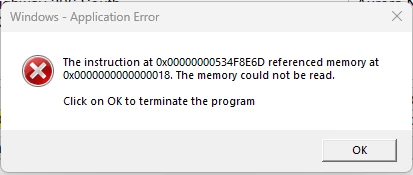
Attempted fixes: Repaired Adobe Acrobat. Changed this setting - Preferences-> Security (Enhanced)-> unchecked the checkbox "Run in AppContainer". No luck.


The same email with pdf attachment works without issue when using Outlook Classic. All other pdfs stored in folders locally, in the cloud, or on network drives open without issue. Seems purely an issue with the new Outlook and Adobe Acrobat. 


Any other suggested things to try, or any news on a fix coming in an update to either Acrobat or Outlook?


15 Antworten

Participant
October 2, 2025

Same issue, need a fix

Participant
September 29, 2025

Has there been a fix issued for the memory error yet? it's been 6 months since this was first reported

Participant
September 24, 2025

Same here - hopefully a fix isn't far away

Participant
September 23, 2025

Same Issue here - commenting to follow

Participant
September 16, 2025

Same issue. Commenting to follow thread in case they eventually come up with a solution....

Participant
September 16, 2025

Also having this issue. I see the last update from Adobe was in August, any updates on this? 

Participant
September 15, 2025

Same issue, New outlook, error comes up only if adobe is not already open.

I cannot figure it out. Reg keys only worked once.

Also is everyone else having the issues only if it is adobe standard, or pro, But not the free version?

Participant
September 11, 2025

I am having the same issues since updating to Windows 11. Any update as to when this will be fixed?


Participant
June 18, 2025

Same issue.  Submitted logs with Log ID aa9152dd-eb3d-4706-be8f-e77d834c367a


Participant
July 2, 2025

Same issue here. I've also tried uninstalling/reinstalling Acrobat Pro from the CC app.

Participant
July 2, 2025

This workaround to run in compatabilty mode for Windows 8 fixed it, but I'm not sure if there will be any future issues.

  1. Open the Start Menu and search for Adobe Acrobat.
  2. Right-click on Adobe Acrobat and select Open file location.
  3. Right-click on Adobe Acrobat (shortcut or executable file) and select Properties.
  4. Navigate to the Compatibility tab.
  5. Check the box for Run this program in compatibility mode for: and select Windows 8 from the dropdown.
  6. Click OK and restart Adobe Acrobat.
Participant
June 4, 2025

May 6, 2025 we are still recieving the same error message. is there a update?