
Participant
May 18, 2018
Question

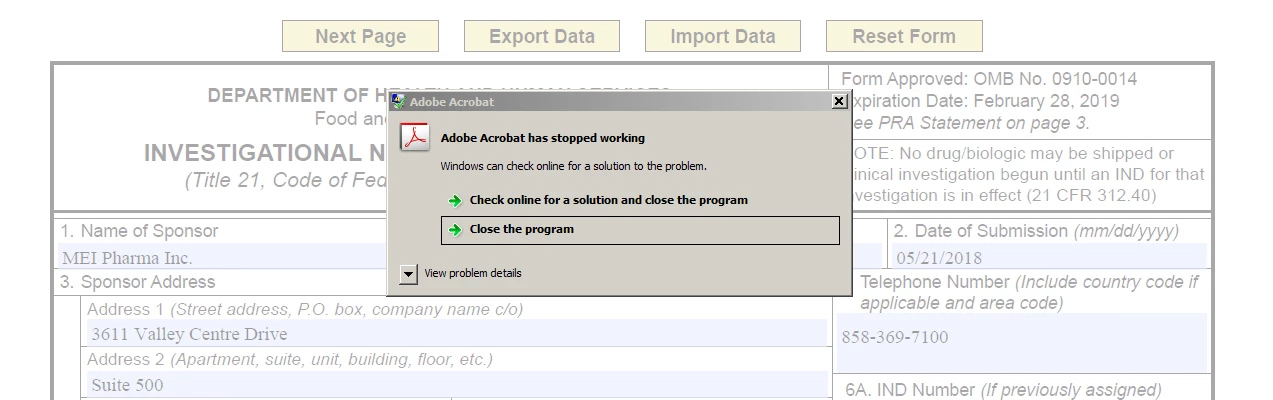
Newest FDA form 1571 crashes Acrobat

  • May 18, 2018
  • 4 replies
  • 1552 views

Most recent release of FDA's form 1571 (4/18) crashes Acrobat, "Adobe Acrobat has stopped working..."

Tried with Acrobat X and XI and Reader on multiple Windows 7 PCs as well as older version of Reader 9.0

URL of the form

https://www.fda.gov/downloads/aboutfda/reportsmanualsforms/forms/ucm083533.pdf

Same thing with Internet Explorer
This topic has been closed for replies.

4 replies

Participant
May 24, 2018

Thanks everyone for your responses.

I have heard from the FDA and they acknowledge there is an issue with the recent release (4/18) of the 1571 form and Acrobat X and XI. The FDA web site says to use Acrobat 8 or 9. These versions had many issues so not a viable solution. Their solution is to use Reader DC. While this is ok for me, I am a not a signer of forms, just a reviewer, my clients do need to e-sign the forms. Many of them are not using Acrobat DC, or Reader Pro. You can't e-sign with basic Reader DC?

Adobe Employee
May 24, 2018

Hi Jeffrey,

You can use fill and sign tool in Reader DC to e-sign them.

Using Acrobat Reader DC Fill & Sign

Regards,

Divya

Adobe Employee
May 24, 2018

Hi Jeffrey,

You can try it with the latest version of Acrobat DC Download Adobe Acrobat free trial | Acrobat Pro DC  or Acrobat Reader DC Adobe Acrobat Reader DC Install for all versions

Regards,

Divya

Bevi Chagnon - PubCom.com
Legend
May 20, 2018

Not crashing for me: Windows 10 with Firefox and also directly in Acrobat DC:2018.

|    Bevi Chagnon   |  Designer, Trainer, & Technologist for Accessible Documents ||    PubCom |    Classes & Books for Accessible InDesign, PDFs & MS Office |
Legend
May 19, 2018

How about a current version rather than an obsolete one...?